ExpressVPN Review: Is It A Reliable Pick for Everyday Browsing and Remote Work?


In partnership with ExpressVPN
Table of Contents
About ExpressVPN

I split my time between the classroom and client writing, with some content management work mixed in. Links from clients sometimes refuse to load in my country. Some research papers and online journals operate under regional rules. Campus Wi-Fi dips in the afternoon, while hotel Wi-Fi crawls during travel weeks. On weekends, I stream, and sometimes I grab torrents so a video is ready when I’m offline.
A colleague pointed me to ExpressVPN. It’s a software you install on your laptop, phone, tablet, or even your TV and router, then tap to connect. You pick a country, and it provides you with a private tunnel; you can then proceed. You get a private tunnel for public Wi-Fi, an extensive list of countries to choose from, and quick region switching for sites that only open in the US or the UK. It works on many devices, and support is available anytime if you encounter any issues.
Besides what the brand claims, I care about what happens while I teach, travel, upload files, and quietly download a big video now and then. So I’m testing the basics that matter to me. Can I reach what I need? Do uploads finish on time? Do torrents stay private without choking my speeds?
If your week looks anything like that, keep going. Let me share my experience of how ExpressVPN performs in my day-to-day work.
ExpressVPN Highlights
- ExpressVPN is a privacy-focused company founded in 2009 with a VPN at its core. They provide software that creates a private tunnel for your traffic.
- The server coverage spans 105 countries with locations in all 50 U.S. states.
- Lightway is the default protocol for quick connects and stable handoffs.
- You can also pick WireGuard, OpenVPN, or IKEv2 inside the app.
- Network Lock on the desktop acts as a kill switch if the VPN drops.
- TrustedServer runs on RAM and reinstalls on reboot, so data is not kept.
- Private DNS is used on every server to keep lookups in-house.
- Independent audits and a privacy policy that excludes activity and connection logs are published.
- Apps are available for macOS, Windows, iOS, Android, Linux, browsers, smart TVs, and routers.
- You can connect 10 to 14 devices simultaneously, depending on your plan.
- Tracker and ad blocking, as well as parental controls, are available in the app.
Why You Should Trust Us
Our mission is to help you make better, more informed purchase decisions.
Our team spends hours researching, consulting with medical experts, gathering insight from expert professionals, reviewing customer feedback, and analyzing products to provide you with the information you need.
ExpressVPN Review

A VPN creates a private tunnel between my Mac and the internet, so my internet provider, ad trackers, or anyone on public Wi-Fi can’t peek inside.
Instead of showing my real IP or city, websites see the VPN server I’m connected to. That helps with region blocks and keeps my location to myself. When the VPN’s on, all traffic runs through that tunnel; turn it off, and it goes out like normal.
ExpressVPN caught my attention because I wanted the same level of privacy and control, without sacrificing speed or ease of use. Before settling on it, I asked myself what actually matters on a day-to-day basis.
Why I Wanted to Use ExpressVPN?
Speed honestly matters in my week. Tuesday’s class has thirty students waiting on Zoom, and the video needs to stay clear. Drafts and lecture recordings should be uploaded to Drive without hanging for minutes. After hours, I stream BBC iPlayer or Netflix, and when it buffers every few minutes, it just kills the mood. A slow VPN quietly doubles the time it takes to complete any task.
I also require consistent access to U.S. client sites and U.K. journals, such as JSTOR and Sage. And when I’m teaching or traveling on school breaks, I’d rather my logins stay private on public Wi-Fi in cafes or hotels.
The other headache is stability. Campus Wi-Fi often drops, and my Mac instantly switches to hotspot mode, which disconnects me from calls or causes edits in Google Docs to be lost.
My setup has to stay simple. Install the app, sign in, pick a country, and connect. If something breaks mid-class, it should fix itself quickly without me having to dig through menus.
That’s my checklist for ExpressVPN, based on how my days actually unfold. If it keeps up without slowing me down, it stays in my setup.
Setup and First Impression
Setting up ExpressVPN on my Mac required minimal effort. Everything from download to first connection felt quick and straightforward, which is how I prefer new apps to start. Here’s how to do it.
- Download and install. I visited the ExpressVPN website, selected a plan, and downloaded the Mac version of the software. The file was small, and the installation finished in about two minutes.
- Sign in and open. After logging in, the app opened to a clean window with one big connect button. The app opened to a simple screen with one big connect button, clear and ready to use.
- Pick a server. It suggested a “Smart Location,” but I switched to a U.S. server since that’s where most of my work connections go. One click, the button turned green, and I was online within a second!
- Test the connection. Web pages that had been loading slowly now loaded right away. Speed tests revealed a slight decrease in my usual Wi-Fi speed, but it was insufficient to affect uploads or Zoom sessions.
The setup was quick, which I appreciated. I didn’t have to dig through settings or approve random permissions. The app installed and connected without a fuss. The first connection was established immediately, and switching between servers felt instantaneous. When my MacBook woke from sleep, it picked up where it left off without dropping the VPN.
Baseline Speed Test (Before VPN)
Before connecting to ExpressVPN, I ran a quick speed test on my regular network. The results were decent for a home connection, with download speeds of around 59.65 Mbps download and 19.06 Mbps, and a 104 ms ping through a Tokyo server.
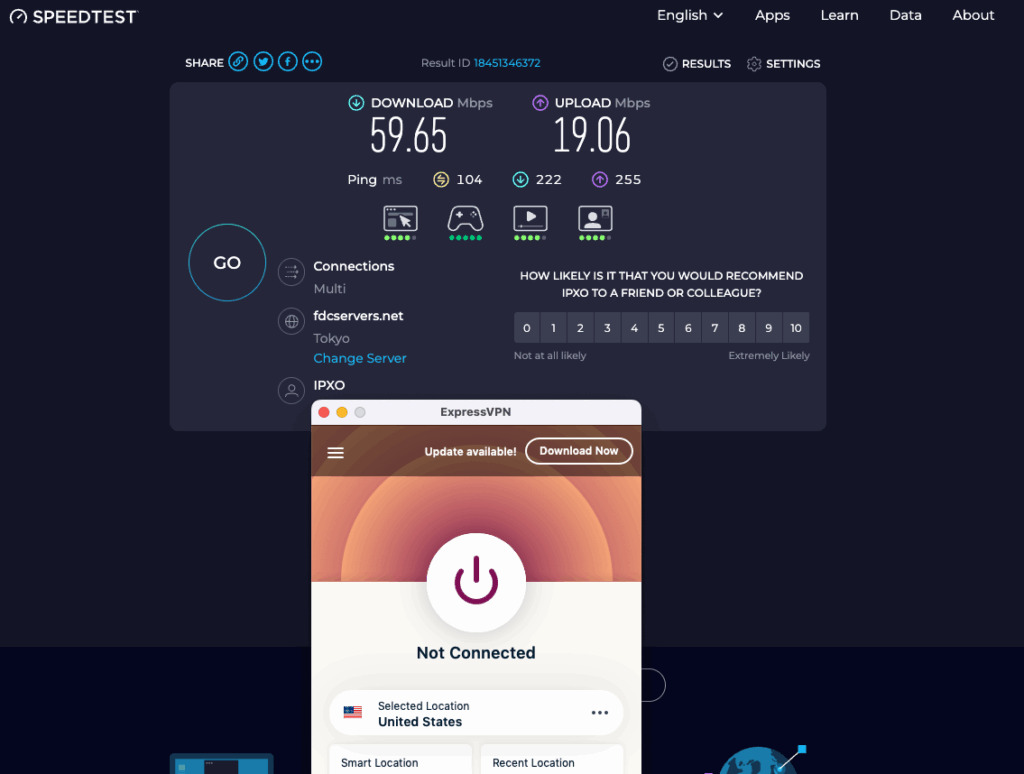
That gives me a fair starting point to measure any drop once the VPN is active. In real-world use, anything above 30 Mbps is sufficient for Zoom, file uploads, and streaming HD lectures. The key thing I’m watching for is how much the ping rises and whether uploads remain stable, because these factors affect teaching sessions and Drive uploads the most.
Speed Test (Connected to ExpressVPN – San Francisco)
Then I connected to ExpressVPN through the San Francisco server. The jump surprised me. The download speeds spiked to 324.70 Mbps, and uploads reached 131.51 Mbps, with ping sitting around 207 ms.
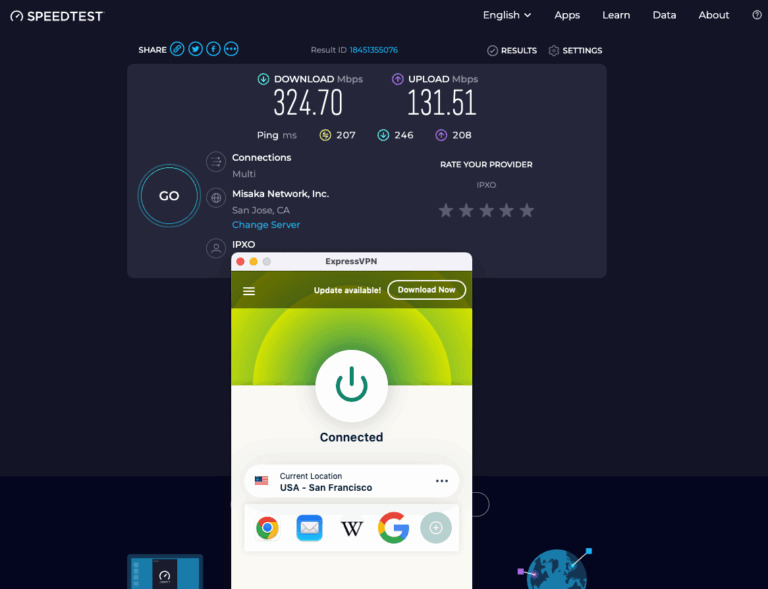
That’s unusually strong for a VPN tunnel, especially over distance. The upload improvement hints that my local ISP was the original bottleneck, not the VPN itself. Pages loaded instantly, and video playback stayed smooth during tests on YouTube and Netflix.
Speed Test (Connected to ExpressVPN – Hong Kong)
I switched over to the Hong Kong server next. The results came back at 222.62 Mbps download and 53.64 Mbps upload, with a 79 ms ping. Not as high as the U.S. server, but still comfortably fast for uploads, teaching calls, and streaming.
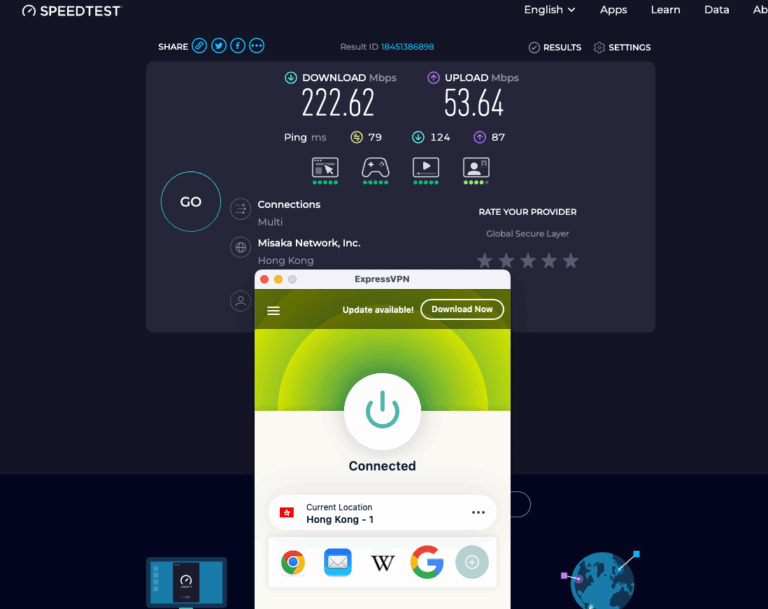
What stood out was how steady it stayed. Pages opened right away, and YouTube videos played smoothly in full HD without a single buffer. It’s a good middle-ground option when I need to stay closer to my actual location or just want stable, fast access without having to jump halfway across the world.
Speed Test (Connected to ExpressVPN – Japan)
I also tested the Japan – Tokyo server, since it’s usually a good midpoint between distance and stability. The results came in quickly, with d 155.81 Mbps and upload speeds of 155.81 Mbps, along with a 67 ms ping. That’s about as smooth as it gets for VPN speeds.
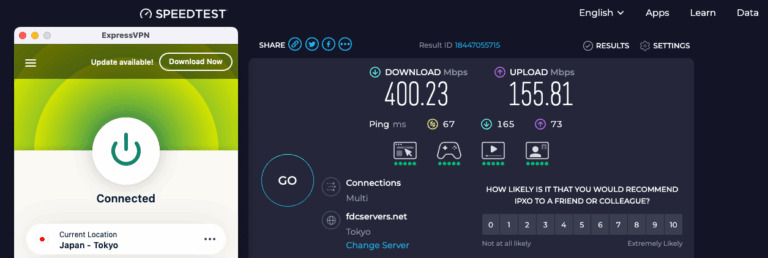
Browsing felt instant, uploads didn’t choke, and streaming stayed crisp even with multiple tabs open. It’s fast enough for lectures, big file transfers, and casual streaming all at once. Out of all the servers I tried, Japan had the most consistent mix of speed and reliability.
Privacy Test (IP and DNS Leak Check)
After running the speed tests, I checked if ExpressVPN actually hid my real IP. I used ipleak.net while connected to the San Francisco server, and every result showed the United States – California with no sign of my local IP. The DNS list also stayed consistent with the VPN’s servers.
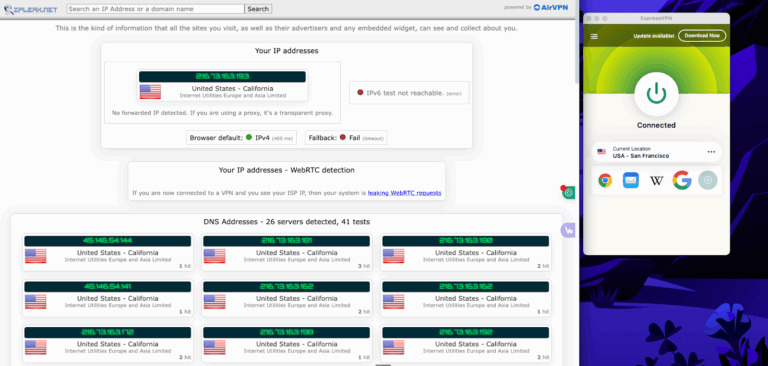
That means the tunnel held firm: no leaks, no location exposure, and no stray connections slipping through. For someone who joins public networks or travels often, that’s the kind of proof that matters more than the speed numbers.
Secondary Check (WhatIsMyIPAddress)
To double-check, I ran another test through WhatIsMyIPAddress.com while still connected to the San Francisco server. It listed my IP address as 216.73.163.24, under Bandito Networks Inc. in San Jose, California. My real IP address remained hidden, and IPv6 was not visible at all.
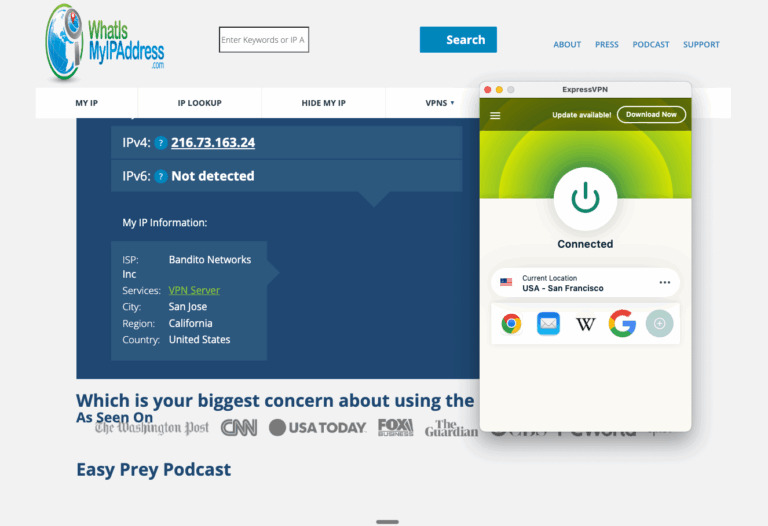
That’s precisely what you want to see! Just the VPN server’s details, nothing personal or local. Between this and the ipleak.net test, it’s clear that ExpressVPN’s tunnel is airtight.
Features That I Find Helpful
Some VPN features sound impressive until you try them and realize they barely make a difference day to day. With ExpressVPN, a few actually did. These are the ones I noticed most while teaching online, switching networks, or working from different cities.
Lightway Protocol
ExpressVPN’s default protocol, Lightway, is what makes the connection feel instant. When I switched between Wi-Fi and my hotspot, it barely blinked. The tunnel reconnected before my browser even refreshed. It utilizes a lightweight codebase that keeps CPU usage low, so my Mac didn’t overheat during long uploads or Zoom sessions. For everyday use, it’s the kind of stability you don’t notice until you use a slower protocol somewhere else.
Network Lock (Kill Switch)
I tested this by manually disconnecting from the VPN during the upload. The transfer stopped right away, exactly as it should. No stray data left the connection.
Once the VPN was reestablished, the upload resumed where it left off. It’s a small reassurance that matters more when you’re handling drafts or university data that shouldn’t travel unprotected.
Smart Location
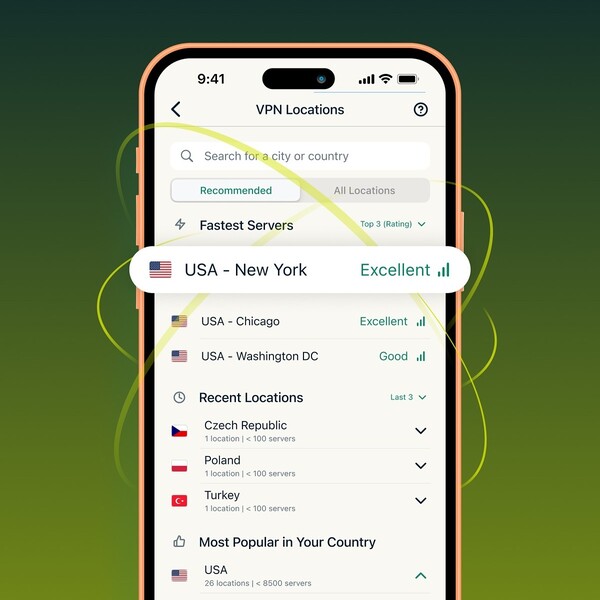
Smart Location suggests the server it believes is the fastest or most stable for your network. Most days, it nailed it. So, I’d click connect and get full speeds. But when I needed access to region-locked sites or U.K. research journals, I had to switch manually. That takes about two seconds in the app, and it remembers the last few servers you used, so swapping back is quick.
Tracker and Ad Blocking
The built-in protection filters out trackers and malicious domains at the DNS level, resulting in fewer data requests before pages load. In practice, it felt lighter.
So far, there are no shady redirects, and fewer random ad scripts are running in the background. It won’t replace a full browser-based ad blocker, but for privacy on public networks, it’s a solid baseline.
How It Performs Day to Day

After a week of use, ExpressVPN mostly faded into the background, which is what I want from a VPN. It starts automatically when my Mac boots up, connects to the last location used, and stays stable through lengthy work sessions.
For online classes, video stayed clear. Screen sharing ran without lag. Uploading lecture videos to Drive felt no different than running on my base connection. Even with multiple tabs open, such as Docs, Zoom, and Spotify, it didn’t choke.
Switching servers was quick, too. I’d use the U.S. for client work, then move to the U.K. for journal work. Each switch took about two seconds and didn’t interrupt what I was doing.
During travel, public Wi-Fi at hotels or airports worked without any setup changes. ExpressVPN recognized the network, reconnected in seconds, and kept me online without revealing my location.
For torrents, downloads stayed fast and private. I checked the peer list out of curiosity and didn’t see my local IP; only the VPN server address was listed. That’s the kind of quiet confirmation that makes me keep it running.
How Much Does ExpressVPN Cost?

ExpressVPN keeps its plans simple, with three main tiers that differ in features and the number of devices supported. Each plan includes unlimited data, 24/7 live chat support, and a 30-day money-back guarantee for first-time users. The long-term plans offer the most significant savings, especially during promotional periods like the current one, which adds four extra months free on a two-year subscription.
1. Basic Plan – $3.49/month
Billed $97.72 for the first 28 months, then $99.95/year on renewal.
- Up to 10 simultaneous device connections
- Lite Protection (blocks ads and malicious sites)
- 30-day money-back guarantee
- All core VPN features: Lightway protocol, TrustedServer tech, and no-logs policy
2. Advanced Plan – $4.49/month (Most Popular)
Billed $125.72 for the first 28 months, then $119.95/year on renewal.
- Up to 12 simultaneous device connections
- Advanced Protection (blocks ads, trackers, and malicious sites)
- Password manager included
- 3-day eSIM data from Holiday.com
- ID monitoring with fraud alerts and theft insurance (US only)
- 50% off coupon for Aircove Wi-Fi 6 routers
3. Pro Plan – $7.49/month
Billed $209.72 for the first 28 months, then $199.95/year on renewal.
- Built-in Password Manager
- Up to 14 simultaneous device connections
- Advanced Protection and password manager
- Dedicated IP (not yet supported on macOS)
- 5-day eSIM data from Holiday.com
- ID monitoring with fraud alerts and theft insurance (US only)
- Monthly credit reports (US only)
- 75% off coupon for Aircove Wi-Fi 6 routers
All plans include access to servers in 105 countries, Lightway protocol for faster speeds, and post-quantum protection for added security.
If you want additional tools, such as a dedicated IP address or more device slots, the Pro plan covers everything. But for most users, the Advanced plan offers the best balance of cost and features, especially with the long-term discount and added eSIM data.
ExpressVPN Review: What Do Customers Think?

Before I signed up, a colleague recommended ExpressVPN, but I still wanted to see what others had to say. A few searches later, I found it almost everywhere — on Forbes, CNET, PCWorld, and Trustpilot, all of which pointed to the same conclusion: ExpressVPN stands out for its reliability, speed, and focus on privacy.
Most reviewers agree that it feels effortless to use, with solid performance across all platforms. PCWorld described it as “a premium service worth every penny,” while CNET wrote that “ExpressVPN remains one of the best VPNs in the world because it excels at virtually everything that a VPN service should be doing and it keeps getting better.” Tech editors consistently highlight how smooth it is to stream, connect, or switch regions without losing speed.
User reviews tell a similar story. On Trustpilot, ExpressVPN is reviewed by over 26,000 users. Many of them praise the stability it maintains across different networks and the prompt response of the support team when issues arise. “This product is exceptional and head and shoulders above the competition,” one user wrote. Another shared, “Support was almost near real time. They understood my issue and worked at the speed of light to resolve it.”
Others mention that it’s reliable year after year, whether they’re traveling or using it for work. “It’s reliable, fast, and secure,” one reviewer said, “but what truly sets them apart is their outstanding customer support.”
After reading through dozens of these, I figured the praise wasn’t just marketing talk. ExpressVPN consistently ranks high in tech reviews and user feedback for the same reasons — its speed, strong privacy, and support that actually provides help when needed. It’s one of those tools that keeps doing its job quietly in the background, which is precisely what you want from a VPN.
Is ExpressVPN Legit?
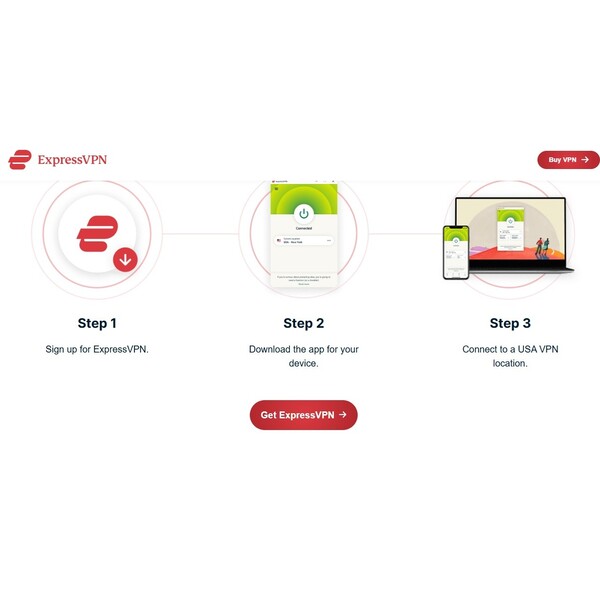
Yes, ExpressVPN is absolutely legit. It’s one of the most established VPN providers in the world, operating since 2009 with a strong track record in privacy and security. The company is based in the British Virgin Islands, a jurisdiction renowned for its strict privacy laws, and it operates on TrustedServer technology that erases all data with every reboot.
ExpressVPN’s system has been verified through more than twenty independent security audits from firms like KPMG and Cure53, confirming that it doesn’t store or log user activity. Between its consistent transparency reports, public audit results, and years of proven reliability, ExpressVPN has earned its reputation as a trustworthy and credible VPN service.
Is ExpressVPN Worth It?
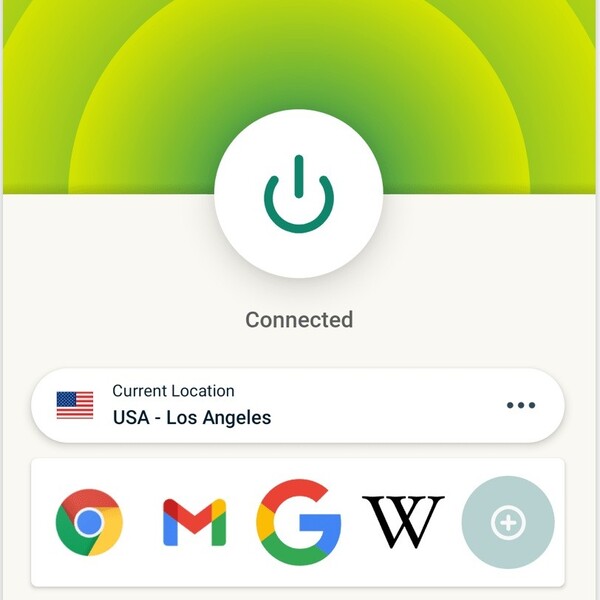
After a few weeks of using it across classes, trips, and client work, I’d say it’s worth keeping. ExpressVPN feels reliable in a way that’s easy to forget about, which is exactly what I want from a VPN. It connects quickly, stays steady, and allows me to reach what I need without slowing down.
The speed stayed consistent whether I was teaching online, uploading videos, or streaming in the background. Region-locked sites opened without incident, and the connection remained stable during tests. It’s fast, secure, and never got in the way of what I was doing.
It’s not the cheapest option out there, but it earns its price by staying dependable every day. For anyone who works remotely, travels often, or just wants a bit more control online, ExpressVPN fits right into that routine.
ExpressVPN Discounts and Promotions

Right now, ExpressVPN is running a limited-time Black Friday promotion that gives you an extra 30% off the 12-month and 24-month plans. This old school Black Friday offer expires quickly and disappears after Cyber Monday on December 1st.
All plans include a 30-day money-back guarantee, so you can try the service without risk. If you want the lowest possible price on a top VPN, this is the best time to lock it in.
Where Can I Buy ExpressVPN?
You can sign up for ExpressVPN through their official website. That’s where all verified plans, current discounts, and bundles are available. Once you subscribe, you’ll get instant access to your account so you can download the apps and start using the service right away.
FAQs
Does ExpressVPN work in countries with internet restrictions?
Yes. ExpressVPN has obfuscated servers designed to work even in regions with heavy censorship. They hide VPN traffic so that it appears as regular web activity, which helps you stay connected on restricted networks.
Can I use ExpressVPN on my TV or console?
You can. ExpressVPN has apps for smart TVs, Fire TV Stick, Android TV, and Apple TV. It also supports PlayStation, Xbox, and Nintendo through router setup or MediaStreamer, which lets you stream geo-blocked content on devices that don’t natively support VPN apps.
Does ExpressVPN allow torrenting?
Yes, peer-to-peer (P2P) activity is allowed on all servers. There are no bandwidth limits or throttling, ensuring consistent downloads and uploads across different locations.
Does ExpressVPN keep any logs?
No activity logs are kept. ExpressVPN doesn’t store browsing history, DNS queries, or IP addresses. Independent auditors, such as KPMG and PwC, have verified these claims through regular audits.
Enjoyed this review? Well, there’s plenty more from where this one came from! Check them out!
Brilliant Earth Engagement Rings Review





Ask the community or leave a comment
WRITE A REVIEWCustomer Reviews
Leave a review