
In partnership with Adobe
Table of Contents
About Adobe Firefly AI Video Generation
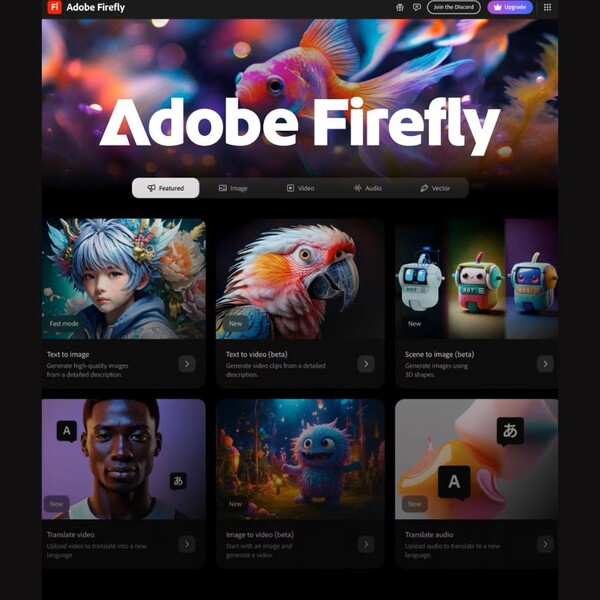
Video editors and content creators know the struggle of turning ideas into polished content without spending hours cutting clips or searching for stock footage that almost fits. The tools help, but they don’t always keep pace with how quickly ideas evolve.
Adobe has been shaping digital creativity since the early days of Photoshop and Premiere. They’ve built software that millions rely on for design, photography, and film.
Now, Adobe continues to expand Adobe Firefly with new AI models and partner integrations, giving creators access to multiple industry-leading systems within a single platform. These updates are designed to improve quality, flexibility, and creative control across both image and video generation.
One of the most important additions is the introduction of custom models, which allow users to train Firefly on their own assets to generate content that matches a specific brand or visual style.
Firefly promises detailed 1080p video with smooth motion, realistic lighting, and control over camera movement and animation. You can even add sound effects or translate videos into other languages without leaving your workflow.
It sounds almost too easy. So, how well does it actually work when you try it? Let’s look at what Firefly’s AI Video Generator can really do.
Highlights
- Adobe Firefly turns text prompts into full 1080p video clips in seconds.
- Users can control lighting, camera movement, and animation timing for each clip.
- It can translate video and audio tracks into more than twenty languages.
- The sound effects generator creates custom audio from short text prompts or recorded sounds.
- Every video generated is downloadable as an MP4 file up to five seconds long.
- Firefly integrates directly with Photoshop, Premiere Pro, and Adobe Express for quick editing.
- Adobe trains its model on licensed content so your output is designed for commercial use
- Firefly offers flexible plans with monthly credits tailored to various creative needs.
- The system supports quick brainstorming for B-roll, social reels, and storyboards.
- Firefly Boards let teams collaborate visually and refine ideas together.
- Firefly includes multiple AI models, including Adobe and third-party systems, all accessible in one platform.
- Custom models allow users to generate content based on their own brand, style, or visual identity.
Why You Should Trust Us
Our mission is to help you make better, more informed purchase decisions.
Our team spends hours researching, consulting with medical experts, gathering insight from expert professionals, reviewing customer feedback, and analyzing products to provide you with the information you need.
Adobe Firefly AI Video Generation Review
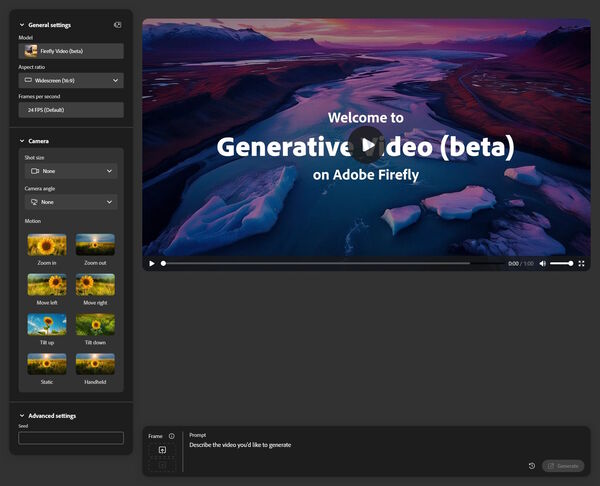
Creating videos typically involves juggling clips, effects, and timing until everything falls into place. Firefly cuts that down to a few prompts and some quick adjustments. Before exploring how it works, here’s a look at the features that make it useful for those who need results quickly.
Unique Features
1. Text to Video
Firefly creates short 1080p video clips directly from text or image prompts. You describe the scene you want, and the system generates a five-second video you can download as an MP4 file. Its prompt enhancement automatically fills in missing context to match your intent without needing technical input.
2. Creative Controls
Firefly allows you to fine-tune elements within the generated video. You can set lighting direction, animation timing, camera movement, and visual style before rendering the clip. These controls give you more influence over how each frame looks and moves.
3. Sound Effects Generation
The sound tool creates custom effects from short prompts or recorded sounds. You can type something like “soft rain” or “crowd cheering,” and Firefly produces an audio file ready to use.
4. Video and Audio Translation
Firefly can translate voice or audio tracks into more than twenty languages while keeping the same pacing and tone. The feature works on both generated clips and imported videos.
5. Integration with Adobe Apps
Firefly connects directly with Photoshop, Premiere Pro, and Adobe Express. You can move clips between tools without exporting or reformatting, maintaining a consistent workflow from generation to final edit.
6. Firefly Boards
This space acts as a shared digital board where teams can drop visuals, video drafts, or ideas. It supports quick comparisons, versioning, and collaborative input within a single workspace.
7. Custom Models
Firefly allows users to train custom AI models using their own images or brand assets. This makes it possible to generate visuals that stay consistent with a specific style, including colors, lighting, and design elements. For brands and teams producing large volumes of content, this feature helps maintain a cohesive visual identity across different projects.
Benefits
Firefly’s tools sound ambitious on paper, but their real value shows up once you start creating with them. Here’s how they actually help in day-to-day use.
- Speed That Keeps Up With Ideas. Firefly trims the entire production process down to a few prompts and clicks. Instead of spending hours stitching together footage or building mock-ups, you can move from idea to finished clip in minutes. It’s ideal for fast-paced content creation, where turnaround time is as important as quality.
- Creative Control Without Complexity. You don’t need a deep technical background to control how your video looks and moves. Firefly gives direct settings for lighting, motion, and animation timing. That kind of control makes it easier to match a brand style or keep continuity across different projects.
- Realistic, Cinematic Results. The AI model focuses on motion consistency, scene accuracy, and lighting detail to produce smoother, more believable footage. The clips are recorded at 1080p resolution, which is high enough for web, social, and presentation use without feeling artificial or generic.
- Instant Sound and Voice Options. The sound generator covers both sides of production. It can create background effects from text prompts or recorded sounds, and it can translate full videos into over twenty languages. That makes it possible to handle both visuals and audio in one space.
- Fits Into Existing Workflows. Firefly runs within the Adobe environment, so anything created here can be imported directly into Photoshop, Premiere Pro, or Express for refinement. There’s no need to jump through export settings or file conversions. Everything stays consistent inside one ecosystem.
- Built for Teams. Firefly Boards provide a single, shared workspace for design, marketing, and creative teams. You can collect visuals, early drafts, or client feedback in real time. It turns what used to be scattered email threads into a visual conversation that everyone can build on.
- Safe for Commercial Projects. The Firefly model is trained on licensed data and Adobe-owned content, not random internet sources. That reduces the risk of copyright issues and gives creators more confidence in using the output for brand or client work.
- Scales With You. The credit-based plan offers flexibility for both individual creators and large teams. Small users can test ideas with the free plan, while bigger production teams can generate higher volumes under paid tiers.
- Brand Consistency at Scale. With the introduction of custom models, Firefly makes it easier to produce large volumes of content that match a consistent visual identity. This is especially useful for brands, agencies, and teams that need to maintain a recognizable style across campaigns and platforms.
Price
Adobe prices Firefly through a credit-based model. Each plan includes a set number of generative credits each month, covering text-to-video, translation, and sound creation. Once credits run out, users can wait for the next cycle or upgrade if they produce content more often.
Firefly Standard — $9.99 per month
The entry plan includes 2,000 monthly credits. You can make around twenty-five-second clips, translate up to six minutes of video, and create about two hundred sound effects. It’s a good fit for students or solo creators testing short projects or concept drafts.
Firefly Pro — $19.99 per month
Pro doubles the credits to 4,000 each month and unlocks full access to Adobe Express Premium and Photoshop on both web and mobile. Users can generate videos up to 45 seconds long, translate around 13 minutes of footage, and create approximately 400 sound effects. This plan works well for freelancers or small teams producing regular content.
Firefly Pro Plus — $49.99 per month
This plan includes 10,000 monthly generative credits, making it a strong step up from the Pro tier for users who need higher output. It also unlocks unlimited use of Firefly Image Model 4 (IM4), along with full access to Photoshop on web and mobile, plus Adobe Express Premium.
Firefly Pro Plus is designed for creators, marketers, and teams who need more volume and consistency without jumping to enterprise-level pricing.
Firefly Premium — $199.99 per month
The top tier jumps to 50,000 credits and gives unlimited access to the Firefly Video model. It supports up to 166 minutes of translation and approximately 5,000 sound effects per month. It’s built for high-volume studios or brands that need continuous video generation at scale.
Creative Cloud Pro — $69.99 per month (or discounted for students and teachers)
This plan bundles Firefly with over twenty Creative Cloud apps, including Photoshop, Illustrator, Premiere Pro, and Acrobat Pro. It includes 4,000 monthly credits and full access to Adobe’s Creative Suite. Students and teachers can subscribe for $24.99 per month during the first year, then $39.99 after renewal.
Students and Teachers Plan
Starts at $24.99 per month for the first year, then $39.99 after renewal. It mirrors Creative Cloud Pro with Firefly access, 4,000 monthly generative credits, and the full Creative Cloud suite, which is used in schools and training programs.
Firefly’s pricing scales based on how often you use it, with newer plans like Pro Plus bridging the gap between individual creators and high-volume production teams. It’s flexible for testing and production alike, although anyone working outside Adobe’s system might find the credit setup more challenging to justify for occasional projects.
Adobe Firefly AI Video Generation Review: What Do Customers Think?
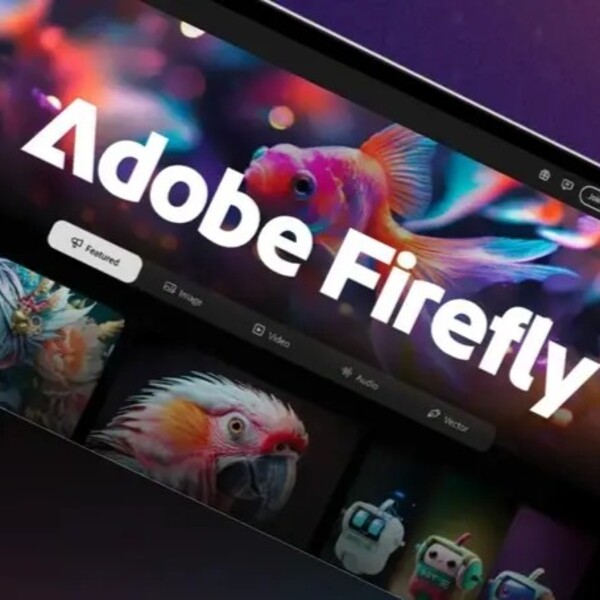
Most users describe Adobe Firefly as a strong creative tool that fits neatly into the workflow of anyone already using Creative Cloud. The mix of AI video, image, and sound generation gets praise for both quality and control. Reviewers often mention how well it works with Adobe’s existing apps, which makes it easier to stay productive without jumping between tools.
One creator wrote, “The tool itself is next level on the quality part, and as we all know quality goes hand in hand with price tags… the Firefly package is well worth the money when used for business purposes.” That sums up much of the feedback: Firefly delivers professional-grade results, though the higher cost can add up for casual users.
Many highlight the visual accuracy and overall polish of the results. One reviewer said, “My experience with Adobe Firefly has been positive. It quickly generates impressive visuals from text and offers great integration with Adobe apps.” That seamless connection to Photoshop and Premiere Pro is a common theme, especially among designers and editors who rely on Adobe for day-to-day work.
Educators and content creators also find Firefly accessible. A teacher shared, “I trained a group of teachers on this and it was a blast to see what they came up with, and then to see some of these images show up in their content.” That shows how easy it is for beginners to create and apply generative visuals without needing advanced design skills.
Professional reviewers echo similar positives. PCMag called Firefly “a promising entrant in the crowded field of generative AI tools,” noting its wide range of style options and polished interface. They also emphasized how Adobe’s ethical stance on AI training gives users peace of mind: Firefly doesn’t use personal or random online content to train its models.
CNET’s review pointed out the strong creative flexibility, saying Firefly’s “excellent artistic styles and good fine-tuning options” make it stand out for people who want detailed control over lighting, texture, and mood. They noted that the generation speed is competitive and the stylistic range suits both artistic and professional needs.
Overall, reviewers describe Firefly as a reliable AI companion for designers, marketers, and educators who want professional-looking results without heavy technical work. The system’s realism still has room to grow, especially with human figures or fine text, but the general consensus is clear: Firefly brings Adobe’s creative precision into the AI space better than most competitors.
Is Adobe Legit?
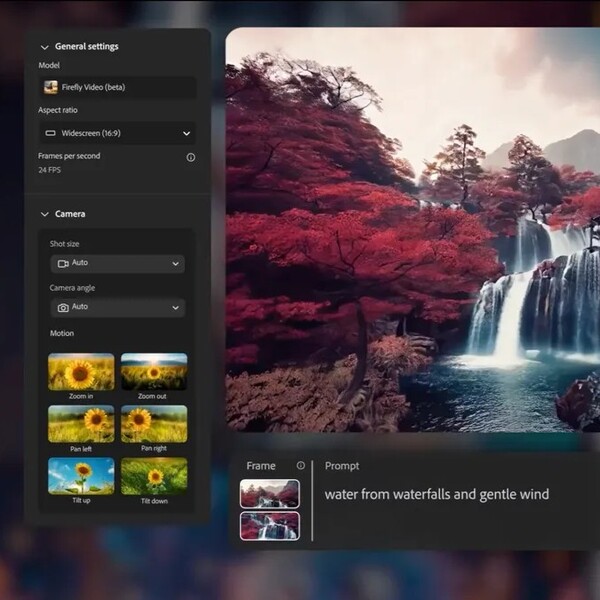
Yes. Adobe is one of the most established names in digital software, and its track record stretches back more than forty years. It’s a publicly traded company on the Nasdaq under the ticker ADBE, employs tens of thousands of people worldwide, and develops some of the most recognized creative tools on the planet — Photoshop, Premiere Pro, Illustrator, Acrobat, and now Firefly. You don’t get that far in the tech world without being legitimate.
Is Adobe Firefly AI Video Generation Worth It?
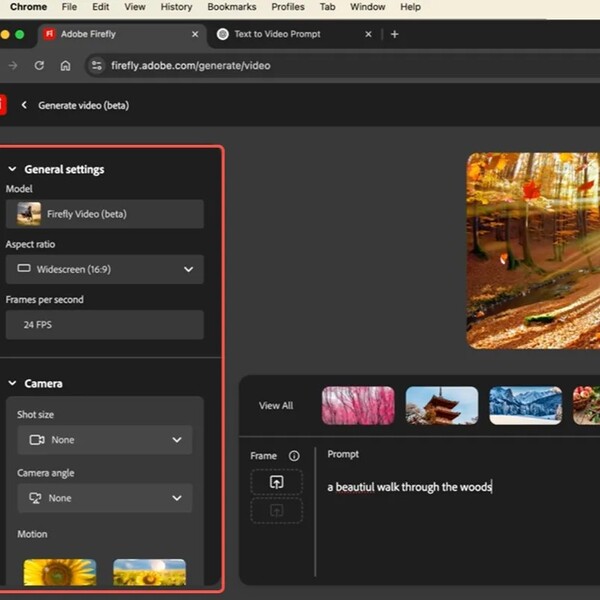
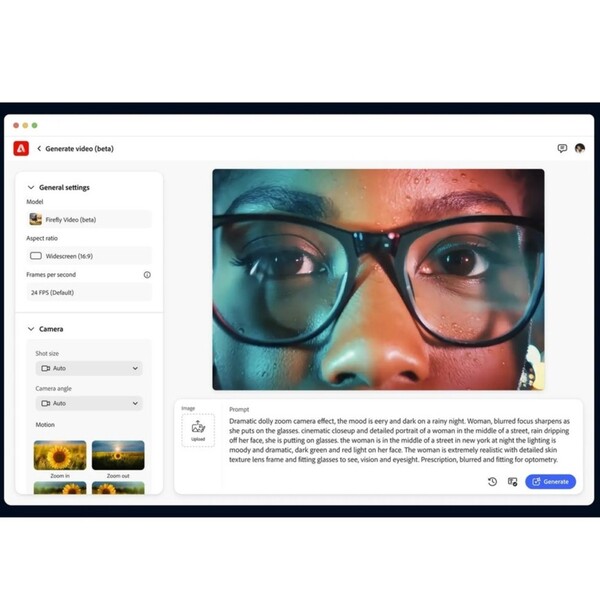
Adobe Firefly’s video generator feels built for people who need quick results without giving up quality. The clips come out sharp at full HD, motion stays steady, and the prompts don’t need fancy phrasing. You describe what you want, and the tool gets pretty close on the first try.
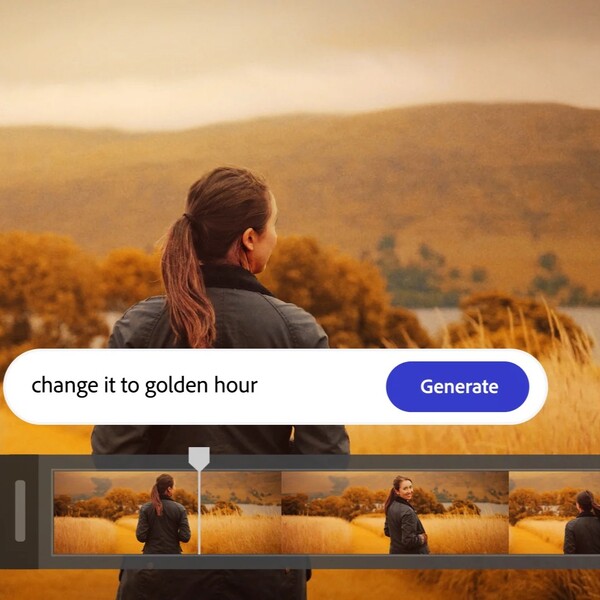
Control is where it really proves itself. Users can set lighting, adjust camera movement, and fine-tune timing before export. Firefly also handles sound effects and language translation inside the same workspace, which keeps projects simple.
The addition of custom models and multiple AI systems also pushes Firefly beyond basic generative tools. It becomes a platform where creators can build consistent, scalable content tailored to their own style or brand identity.
It connects smoothly with Photoshop, Premiere Pro, and Express. You can move a clip between apps without breaking your flow, which makes a big difference for teams that already work inside Adobe’s system.
The pricing depends on how often you create and how many generative credits you need. Firefly offers a free AI video generator with a limited number of uses through a Creative Cloud or Firefly plan. If you need more than what’s included in your plan, you can continue creating by upgrading or purchasing additional credits.
The Standard plan at $9.99 per month works for smaller projects. The Pro plan at $19.99 per month doubles the credits and adds full access to Photoshop and Adobe Express. For heavy users, the Premium plan at $199.99 per month includes 50,000 credits and unlimited access to the Firefly Video model. Students and teachers can access the same tools at a lower rate through Creative Cloud Pro.
For most users, Firefly is worth it. It’s reliable, quick, and consistent. The outputs appear clean, and the system utilizes licensed training data, which helps prevent copyright issues. For content creators, educators, and creative professionals, it’s a powerful tool that saves time without compromising quality.
Adobe Discounts and Promotions
Adobe is currently running limited-time promotions across both Adobe Firefly and Adobe Creative Cloud plans, making it more affordable to access its latest AI tools.
Right now, users can save 50% on the Firefly Pro Plus plan for the first 12 months, along with unlimited generations on select Firefly models and resolutions through April 22.
In addition, customers in the U.S. can get 50% off Creative Cloud Pro for the first three months, offering a lower-cost way to access the full suite of Adobe apps alongside Firefly.
Adobe regularly runs promotions that make its creative tools more accessible, especially for students, educators, and first-time subscribers. Students and teachers get the biggest break with Creative Cloud Pro—the first year drops to $24.99 per month (instead of the regular $69.99), then adjusts to $39.99 after renewal. That plan includes all the major Adobe apps, as well as Firefly.
Occasionally, Adobe offers free trials for both Firefly and Creative Cloud plans, allowing users to test the tools before making a purchase. The Firefly Standard and Pro plans both include trial options that cover the same features, just with limited generative credits.
Beyond education pricing, Adobe offers additional benefits to verified groups, including nonprofits, government employees, and enterprise clients, often through custom plans or bulk licensing agreements.
If you’re planning to subscribe, it’s smart to check Adobe’s Special Offers page before buying. The deals change frequently, but they usually include at least one offer that reduces the monthly cost or provides bonus credits for Firefly users.
Where Can I Buy Adobe Firefly AI Video Generation?
Adobe Firefly is available as a standalone web application at firefly.adobe.com and can also be downloaded on major app stores for mobile use.. It’s also part of Adobe’s Creative Cloud ecosystem of creative apps powered by Firefly generative AI. Features from Firefly are currently built into Photoshop, Illustrator, Adobe Express, Substance 3D, InDesign, Lightroom, and Adobe Stock.
Firefly subscriptions and trials are available only through Adobe’s official site. It is not through third-party resellers. That way, you ensure you’re using a legitimate version with full security and support.
If you’re part of a business, school, or nonprofit, Adobe also offers team and enterprise plans that include Firefly. These can be purchased through Adobe’s sales team or verified partners listed on their site.
FAQs
Does Firefly require an internet connection?
Yes. Since the generative process runs on Adobe cloud, an internet connection is required. You can still edit or refine your results offline afterward in apps like Photoshop or Premiere once the file is downloaded.
What are generative credits and how do they work?
Generative credits are Adobe’s way of managing AI usage. Every time you create an image, video, or sound effect, you use a certain number of credits. The number depends on the task’s complexity. Once your monthly credits are used up, you can wait for them to refresh or purchase additional credits.
Can Firefly be used for commercial projects?
Yes. Adobe trains Firefly on licensed and rights-cleared content, making its outputs commercially safe. That means you can use Firefly-generated visuals in client work, marketing campaigns, or other professional projects without worrying about copyright conflicts.
How do I contact Adobe?
You can contact Adobe through:
- Website: helpx.adobe.com for support and live chat
- Phone: regional numbers listed on the Contact Us page
- Community Forum: community.adobe.com
- Social Media: @AdobeCare on X and Facebook
Next, check out other reviews that you might also like:





Ask the community or leave a comment
WRITE A REVIEWCustomer Reviews
Leave a review