
In partnership with Adobe

Adobe Firefly is changing AI content creation by bringing image, video, audio, and design generation into a single app, with top partner models in a one studio. It also integrates AI directly into Photoshop, Illustrator, Premiere, and Adobe Express, so creators can generate an asset and finish it in the tools they already use. Newer features like Prompt to Edit, Firefly AI Assistant, and Custom Models move Firefly from a single prompt box toward a creative partner that edits in plain language, handles multi-step jobs, and learns a creator’s own style.
The shift answers a problem most creators know well. AI tools multiplied fast, and each one did one thing, so a single social campaign could mean an image generator, a video tool, a voice app, and a design editor, each with its own credits, rules, and file exports. Commercial use made things harder, since many AI models don’t say much about their training data.
Firefly’s approach is to bring those jobs under one roof and make clear what creators can safely publish. The sections below explain what Firefly is, how it’s changing the way content gets made, what’s coming next, and what it costs.
Highlights
- Adobe built Firefly as its AI app for images, video, audio, and design, and it runs on the web, iOS, and Android.
- Its own Firefly models are trained on licensed content from Adobe Stock and public-domain content, and Adobe describes them as commercially safe.
- More than 30 partner models from Google, OpenAI, Black Forest Labs, Runway, Luma, and Kling, and others sit alongside Adobe’s models in the same app.
- Firefly Image 5 creates images at a native 4MP resolution, and the Firefly Video Model turns text or images into 1080p clips.
- Generate Music, Generate Speech, and Generate Sound Effects create soundtracks, voiceovers, and sound effects inside the same app.
- Prompt to Edit changes images from plain-language requests, and AI Markup shows exactly where an edit should go.
- Firefly AI Assistant (beta) handles multi-step creative jobs across Adobe apps from a single request.
- Firefly models also power tools in Photoshop, Illustrator, Premiere, and Adobe Express.
- Outputs carry Content Credentials that mark AI-made content.
Table of Contents
What Is Adobe Firefly?
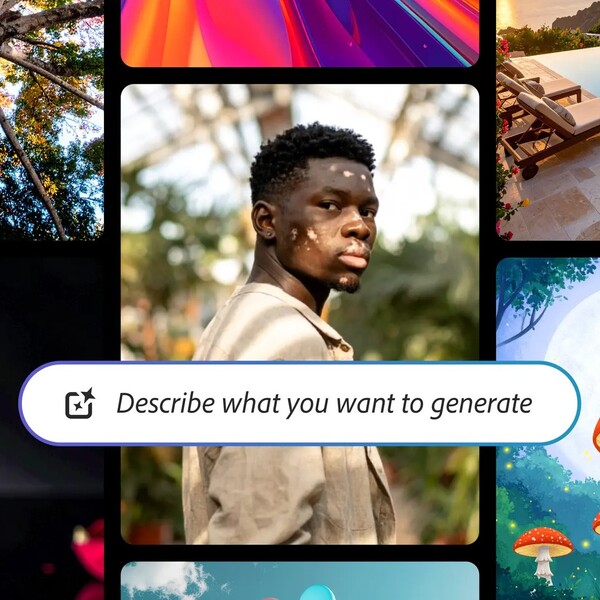
Adobe Firefly is Adobe’s AI app for generating and editing images, video, audio, and designs. Its homepage describes it as “Your AI creative studio,” and it runs on the web, in iOS and Android apps, and inside Adobe’s Creative Cloud apps.
Firefly includes Adobe’s own models, such as Firefly Image 5 and the Firefly Video Model, as well as partner models from Google, OpenAI, Black Forest Labs, Runway, Luma, Kling, and others. Adobe trains its own Firefly models on licensed content, such as Adobe Stock, and on public-domain content whose copyright has expired.
How Is Adobe Firefly Changing AI Content Creation?

Firefly is free to try, with free daily generations, and is changing AI content creation in several concrete ways.
- More than 30 AI models are integrated into a single app.
- Photoshop, Illustrator, Premiere, and Express run Firefly’s AI right inside the apps.
- Images, video, and audio all come from one place, not just pictures.
- Plain-language requests edit images through Prompt to Edit.
- An AI assistant handles multi-step creative jobs across Adobe apps.
- Custom Models learn from a creator’s own work to keep a consistent style.
- Content Credentials label AI-made content so audiences know how it was made.
- Adobe’s own models are commercially safe and trained on licensed content.
Puts More Than 30 AI Models in One Creative App
Creators used to jump between separate tools to find the right look. Firefly now offers “more than 30 top industry AI models,” according to Adobe’s April 2026 announcement, including Google’s Nano Banana models, OpenAI’s GPT Image, FLUX from Black Forest Labs, Runway, Luma, and Kling.
Creators pick a model from one menu, compare results, and keep working in the same project. Adobe’s CTO, Ely Greenfield, described the goal at Adobe MAX 2025.
“We built Firefly to be a single place where you can work with the best AI models in the best creative tools.”
Makes AI Safer for Commercial Work With Licensed Training Data
Commercial safety is one of the biggest questions in AI content creation. Brands, agencies, and creators doing sponsored work need to know they can publish what they generate.
Adobe’s Firefly pages state that “Adobe Firefly models are commercially safe,” and that Adobe trains them on licensed content from Adobe Stock and public-domain content. Adobe also states that it “does not train on users’ personal or generated content.” For video, Adobe introduced the Firefly Video Model in February 2025 as “the industry’s first commercially safe AI video generation model.”
Eligible enterprise customers can also get IP indemnification for select Firefly outputs. Partner models sit alongside Adobe’s models in the app, and Adobe asks users to decide whether partner-model content suits each project.
Brings AI Into Photoshop, Illustrator, Premiere, and Express
Firefly’s models don’t stay in a separate app. They power Generative Fill in Photoshop, Text to Vector Graphic in Illustrator, Generative Extend in Premiere, and image and video tools in Adobe Express.
Creators can generate an image in Firefly, refine it in Photoshop, and send it to Express to design and schedule a post. In Premiere, Generative Extend adds up to 2 seconds to the start or end of a clip, with support for 4K and vertical video, which helps editors cover a cut or hold a shot a little longer.
Adds Video and Audio to AI Image Generation
Firefly started with images and now covers far more. Firefly Image 5 generates images at a native 4MP resolution, and the Firefly Video Model turns text or images into 1080p clips with controls for shot size, camera angle, and camera motion.
Audio is part of the package too. Generate Sound Effects adds ambient sound and effects to video; Generate Speech creates voiceovers using voices from the Firefly Speech Model and ElevenLabs; and Generate Music makes original tracks that match a video’s length and mood. Adobe previewed the music and speech tools in beta at Adobe MAX 2025, and all three audio tools became generally available in August 2026.
Firefly Video brings these pieces together on a multitrack timeline, where creators can generate, trim, and sequence clips and export up to 4K.
Lets Creators Edit Images by Describing the Change
Prompt to Edit gives Firefly a conversational editing interface. Adobe describes it as a way for creators to “describe the edits” they want in everyday language, such as changing a background or swapping an object.
Prompt to Edit is generally available with Firefly Image 5 and with partner models from Black Forest Labs, Google, and OpenAI. AI Markup, added in April 2026, gives creators more control by letting them draw on an image with a brush or rectangle tool to show where an edit should happen.
Hands Multi-Step Creative Jobs to an AI Assistant
Firefly AI Assistant, powered by Adobe’s creative agent, is the clearest sign of where Firefly is heading. Creators describe an outcome, and the assistant coordinates the steps at scale across Creative Cloud apps.
In Adobe’s framing, creators provide “vision, judgment, and creative direction,” and the assistant handles coordination and execution. Its Creative Skills are prebuilt workflows for jobs such as social media assets, portrait retouching, and mockups, and creators can customize them or build their own. An example on Adobe’s feature page turns a single hero image into smart crops for every social platform.
Firefly AI Assistant entered public beta in the Firefly web app in April 2026, and June 2026 updates added skills for brand kits, short product videos from photos, and quick first edits of video clips. It’s available on Creative Cloud Pro and on Firefly Pro, Pro Plus, and Premium plans.
Trains Custom Models on a Creator’s Own Style
Consistency is hard with general AI models, especially for creators with a recognizable look. Firefly Custom Models let creators drag and drop images they have rights to and personalize a model that generates new assets “with visual consistency in their own, unique style.”
Custom Models are private by default and need the creator’s permission before anyone else can use them. Adobe first offered them to enterprise customers and is now bringing them to creators through a waitlisted private beta in the Firefly app and Firefly Boards.
For larger companies, Firefly Foundry tunes Firefly models to a company’s or IP owner’s content, with a focus on studios and other enterprises.
Labels AI-Made Content With Content Credentials
As AI content spreads, audiences want to know what’s real. Firefly outputs include Content Credentials, which Adobe describes as industry-standard, tamper-evident metadata that marks AI-made content. In Firefly Boards, credentials also show whether an asset came from Firefly or a partner model.
What Does Adobe Firefly Mean for Content Creators?

For working creators, Firefly changes the day-to-day in practical ways.
- Less tool switching. Images, video, audio, and design live in one subscription, and Firefly Pro includes Adobe Express Premium and Photoshop on web and mobile.
- Faster formatting. The AI Assistant and Express resize and crop content for each platform.
- Safer sponsored work. Commercially safe Adobe models give creators more confidence when they publish brand content.
- A consistent look. Custom Models and style references help creators keep a recognizable style across a series.
- Room for human direction. Adobe says it “views AI as a tool for, not a replacement of, human creativity,” and its tools keep creators in charge of the final decisions.
Adobe’s David Wadhwani framed it in April 2026.
“Your perspective, voice and taste become the most powerful creative instruments of all.”
What Comes Next for Adobe Firefly?

Adobe has announced several projects that point to Firefly’s next stage.
- Next-generation models with NVIDIA. In March 2026, Adobe and NVIDIA announced a strategic partnership to develop the next generation of Firefly models on NVIDIA technology, covering image, video, audio, vector, and 3D content. Adobe hasn’t shared a release date.
- Topaz Labs upscaling tools. In June 2026, Adobe agreed to acquire Topaz Labs, whose upscaling and image-quality models already appear in Firefly.
- Adobe MAX 2026. Adobe’s annual creative conference runs November 10 to 12, 2026, in Miami Beach and online, where Adobe typically announces new Firefly features.
Adobe Firefly Timeline: Key Launches
| Date | Launch |
| February 2025 | New Firefly app and the Firefly Video Model (beta), with Firefly Standard and Pro plans |
| April 2025 | Firefly Image 4 and Image 4 Ultra, Firefly Video Model generally available, Firefly Boards beta, first partner models |
| June 2025 | Firefly mobile apps for iOS and Android |
| October 2025 | Firefly Image 5, Prompt to Edit, music and speech generation betas, Custom Models |
| January 2026 | Firefly video editor public beta |
| April 2026 | Firefly AI Assistant, Precision Flow, AI Markup, and Kling 3.0 |
| June 2026 | New AI Assistant skills and an agreement to acquire Topaz Labs |
How Much Does Adobe Firefly Cost?
| Plan | Price | Generative credits a month |
| Firefly Free | $0 | Limited daily generations |
| Firefly Standard | $9.99/mo | 2,000 |
| Firefly Pro | $19.99/mo | 4,000, plus Adobe Express Premium and Photoshop on web and mobile |
| Firefly Pro Plus | $49.99/mo | 10,000 |
| Firefly Premium | $199.99/mo | 50,000, plus unlimited Firefly Video Model access |
All paid plans include unlimited standard image features, partner models, and Firefly Boards. Creative Cloud Pro, which includes Firefly, costs $69.99/mo on an annual plan billed monthly.
Is Adobe Firefly Worth It?

Yes, Adobe Firefly is worth it for creators, marketers, and businesses that regularly produce visual content. It combines image, video, and audio generation with commercially safe Adobe models and more than 30 partner models, so one subscription can replace several single-purpose AI tools.
The value grows on Firefly Pro. It adds 4,000 generative credits a month, Adobe Express Premium for templates, brand kits, and post scheduling, Photoshop on web and mobile, and access to Firefly AI Assistant. Creative Cloud Pro subscribers get Firefly alongside Photoshop, Illustrator, Premiere, and the rest of Adobe’s apps.
People who want to try it first can start with the free plan’s daily generations. Firefly Standard, at $9.99/mo, adds 2,000 credits a month and unlimited standard image features.
Frequently Asked Questions
Is Adobe Firefly free?
Yes, Adobe Firefly offers a free plan with limited daily generation on both the web and in its mobile apps. Paid plans start at $9.99/mo.
Is Adobe Firefly safe for commercial use?
Adobe states that its Firefly models are commercially safe and that it trains them on licensed and public-domain content. Partner models in Firefly follow their own terms, so creators should check whether partner-model content fits each project.
Which AI models does Adobe Firefly use?
Firefly uses Adobe’s own models, including Firefly Image 5 and the Firefly Video Model, as well as more than 30 partner models from companies such as Google, OpenAI, Black Forest Labs, Runway, Luma, and Kling.
Does Adobe train Firefly on my content?
No. Adobe states that it does not train on users’ personal or generated content and that it doesn’t train Firefly or partner models on Creative Cloud subscribers’ personal content.
What is Firefly AI Assistant?
Firefly AI Assistant is an AI agent in public beta that handles multi-step creative tasks across Adobe apps from a single request. It’s available on Creative Cloud Pro and Firefly Pro, Pro Plus, and Premium plans.
Final Thoughts

Adobe Firefly is changing AI content creation by making it more connected and more dependable. Creators get ease, speed, and top AI models in one place, commercially safe Adobe models for client and sponsored work, and AI that runs inside Photoshop, Illustrator, Premiere, and Express.
The newest tools show where things are going. Prompt to Edit, Firefly AI Assistant, and Custom Models let creators describe what they want, hand off repetitive steps, and keep their own style. With next-generation models in development and Adobe MAX 2026 this month, Firefly’s role in how creators work is set to keep growing.
Next, check out other related reviews that you might also like:





Ask the community or leave a comment
WRITE A REVIEWCustomer Reviews
Leave a review