

Desktop lasers promise push-button projects. In reality, many of us end up babysitting a noisy box that fills the room with smoke while we contend with drivers, camera alignment, and focus sticks. You buy more power and a bigger bed so you can do “real work,” then lose an evening to test grids and guessing whether the beam is actually in focus.
ACMER is one of the brands trying to make that less painful. They build enclosed diode machines with proper lids, interlocks, and a growing pile of accessories, aimed at home workshops, small studios, and side hustles that want serious cutting power without going full industrial. The pitch is simple enough: keep the price below a CO₂ unit, add a camera to line up jobs visually, include an air pump, filtration, and a conveyor option to accommodate long boards and panels.
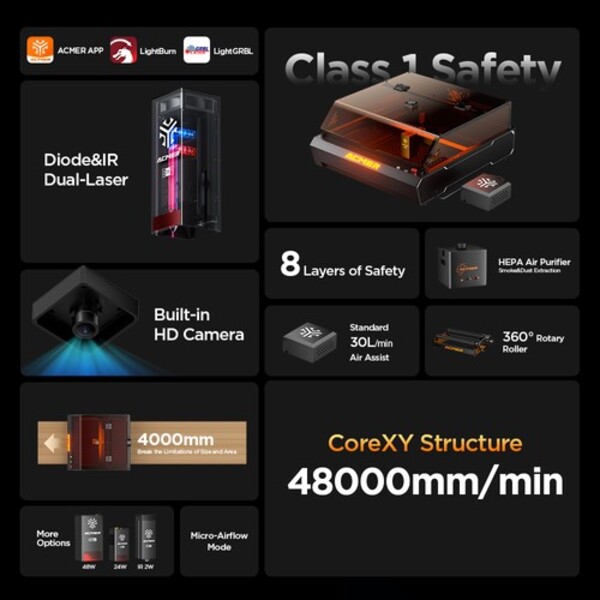
The P3 48W sits right in the middle of that story. Big enclosed chassis, 400×390 mm work area, swappable heads up to 48W, a top-down camera, CoreXY motion, optional rotary and conveyor, plus support for LightBurn on top of ACMER’s own desktop and phone apps. On paper, it sounds like a “real” workshop tool for people who outgrew the little open-frame 10W rigs.
The question is, does any of that actually make life easier at the bench, or is it just another machine that looks great in a spec sheet and then consumes your weekend with setup and fiddling? I ran the P3 through unboxing, setup, software, and a bunch of real engraving and cutting jobs in my own space. Read on to discover what went smoothly, what didn’t, and whether this feels like a good fit for a home shop laser user rather than a full-time laser technician.
Highlights
- ACMER builds enclosed diode laser engravers for home workshops and small studios that want more power and safer housing than tiny open-frame hobby machines.
- ACMER’s P3 48W is an enclosed diode laser designed for home workshops and small studios that have outgrown small, open-frame hobby machines.
- The P3 48W module can run at full 48W for faster cutting or switch down to 24W when you want finer detail and less overburn.
- A 400 × 390 mm work area and a honeycomb bed provide ample room for cutting boards, signs, and small batch runs without requiring constant repositioning.
- CoreXY motion enables the head to move quickly across the bed while maintaining a straight beam orientation, resulting in clean, vertical cuts.
- A lid-mounted camera enables you to align artwork on real materials inside the bed, rather than relying solely on measurements.
- Optional extras, such as a rotary chuck, long conveyor feeder, and filter box, turn the P3 into a more comprehensive small workshop system than a single-purpose desktop toy.
- Full support for LightBurn means you can use a familiar workflow, with ACMER’s own desktop and phone apps available for very simple jobs.
Why You Should Trust Us
Our mission is to help you make better, more informed purchase decisions.
Our team spends hours researching, consulting with medical experts, gathering insight from expert professionals, reviewing customer feedback, and analyzing products to provide you with the information you need.
Table of Contents
ACMER P3 48W Diode Enclosed Laser Engraver Review
Open-frame diode lasers are great right up until the room fills with smoke and the job still isn’t done. My first cheap rig sat on an open bench, took ages to cut anything thicker than craft plywood, and always felt a bit sketchy to run indoors. I could get decent results, but it meant babysitting the machine, cracking a window in winter, and hoping the cat didn’t wander past the beam.
At some point, I wanted something that felt more like a proper shop tool: enclosed, more power on tap, air assist built in, and a work area big enough for real boards and signs. I also wanted to stop juggling makeshift fume extraction and random safety goggles from Amazon and move to a box that looks like it belongs in a workshop, not a science fair.
Now, let me tell you what I think about ACMER’s P3 48W in detail. I pulled it into my small home shop to see if it actually solves those headaches or just trades them for a different set of problems.
Key Specs
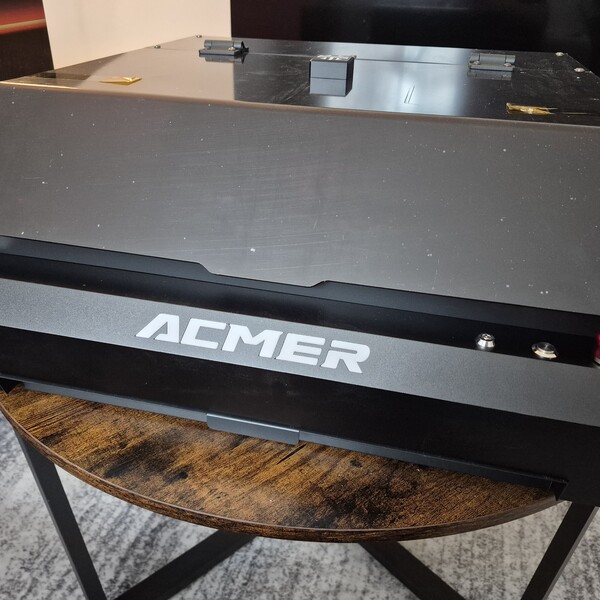
Enclosed 48W diode laser
The P3 is a box-style diode laser with the beam fully enclosed by a lid, rather than being open on a frame. The 48W head has significantly more power than the 5–10W hobby units I started with, so cutting thicker wood and making deeper passes actually makes sense.
Work area and footprint
Inside, the honeycomb bed gives roughly 400 × 390 mm of usable space. That’s enough for boards, signs, and a row of small parts. Outside, the chassis falls within the “big desktop printer” range, so it requires a real bench but doesn’t occupy the whole room.
CoreXY motion and camera
A CoreXY gantry moves the head while the beam always points straight down. There’s a camera in the lid that displays a top-down view of the bed in software, which I use to roughly place artwork on coasters, boards, and other blanks, rather than relying solely on measurements.
Air assist and exhaust
The bundled air pump plugs into the side of the machine and feeds air through the nozzle to keep flames and debris down during cuts. On the back, a large exhaust port connects to a flex hose that can run to a window, vent, or filter box if you’re working indoors.
Controls and safety hardware
Up front, there’s a key switch, an emergency stop, and a power button; on the back, separate switches control the internal light and main fan. The honeycomb bed sits on a tray that slides out from the front, which makes clearing offcuts and checking what fell through a lot easier.
Software and device support
The P3 has no built-in screen, so everything runs through external software. I drive it from LightBurn on a PC for day-to-day tasks, but it also communicates with ACMER’s desktop app, LaserGRBL, as well as a basic phone app compatible with Windows, macOS, Linux, Android, and iOS.
Unboxing and What’s in the Box

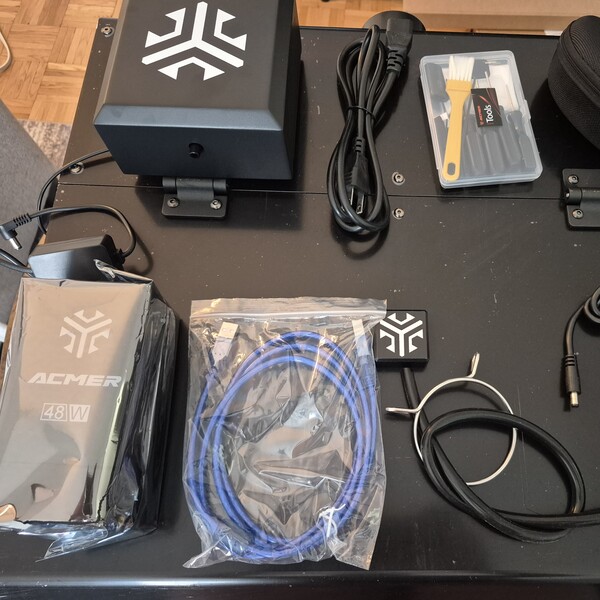
The P3 arrives in a large, branded carton that isn’t light at all. I could shuffle it around on the floor by myself, but lifting it to bench height was a two-hand, think-before-you-lift moment. If you don’t have a solid base, consider getting help or placing it near the machine’s intended location, as you won’t want to move it far once it’s out of the packaging.
What’s Inside?
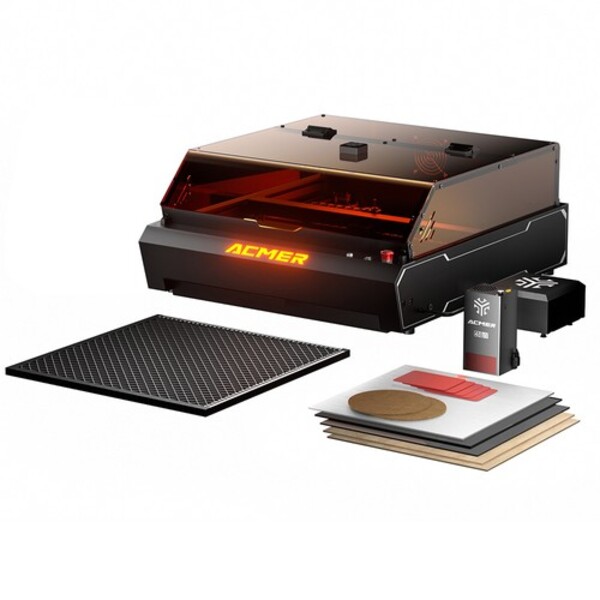
Under the foam, there’s a complete “kit to get started” rather than just the bare machine. In my case, that meant:
- The main enclosed P3 unit
- The 48W laser module
- The external air pump
- Power brick and power cable
- USB cable for the PC connection
- Two small air hoses for air assist
- A length of exhaust hose plus a clamp
- A handful of sample engraving materials
- A basic tool kit (Allen keys, screwdriver, and a tiny cable with a micro USB for setup)
- A pair of laser safety goggles
- An SD card with the manual and a video setup guide
By the time everything was laid out on the bench, it felt like a full system rather than a bare frame and a laser head.
Ports, Buttons, And Switches On The Unit

From the outside, the P3 is pretty straightforward to drive once you know what each control does.
- Power button: Front panel button that actually wakes the machine up once the key is turned on. No power here, no connection in software.
- Safety lock (key): Key switch on the front that has to be inserted and turned before the power button does anything. Handy if you share the space with kids or curious guests.
- Emergency stop button: A large red mushroom-shaped button on the front. One hit here can instantly kill the power to the machine if something malfunctions or goes wrong.
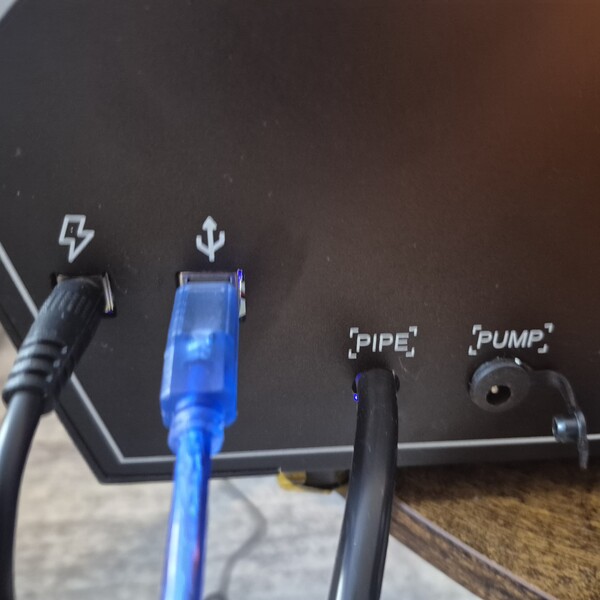
- Power port: The standard power inlet located on the side of the unit, where the power brick plugs in.
- USB port: USB-B port on the side for connecting to a PC or laptop. This is the main control link for LightBurn and other desktop software.
- Air pipe port: Hose connection on the side that feeds air from the pump into the laser head for air assist.
- Air pump power port: A Separate power jack on the side that powers the external air pump.
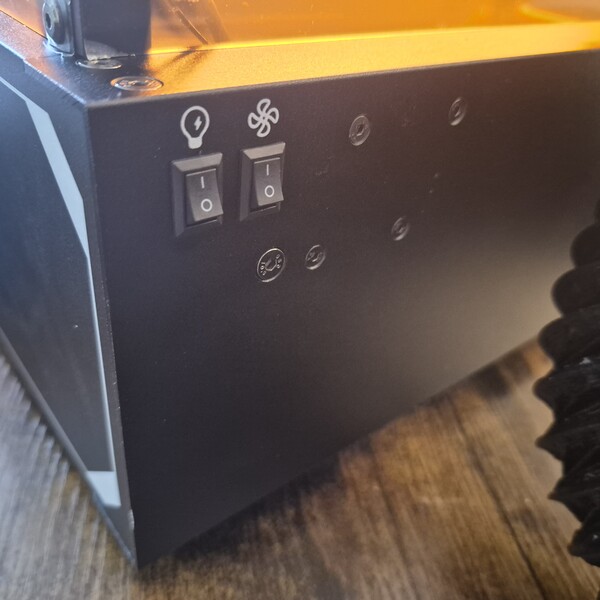
- Light switch: A rocker switch located on the back panel that activates and deactivates the internal work light.
- Fan switch: A rocker switch located on the back that controls the internal exhaust fan.
Once you understand where these sit, powering up and getting the machine talking to the computer becomes routine.
The Set Up


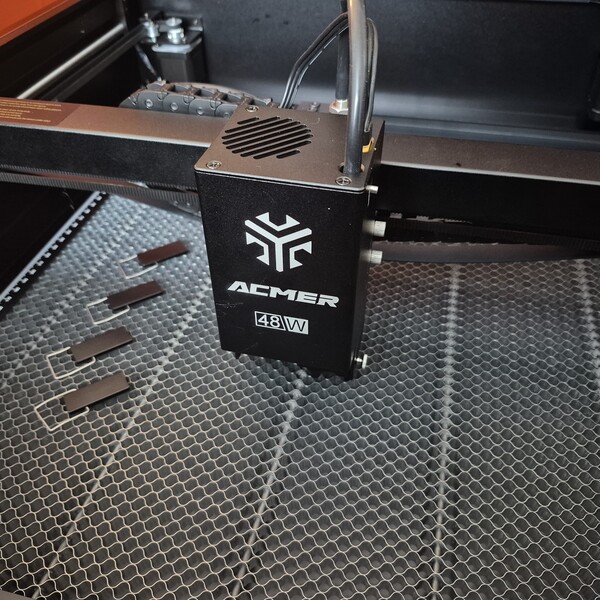
Setup felt relatively easy, more like assembling a mid-range 3D printer than building a machine from scratch.
1. Removing transport blocks and installing the head
The first step after unboxing was to remove all the foam and then pull out the plastic blocks that held the Y-axis in place on both sides. The included tools handled that without drama.
Next, the 48W laser module was mounted inside the enclosure. I bolted it down, then plugged in the laser power cord and pushed the air pipe onto the fitting on the head.
2. Hooking up the air pump and cables
On the outside of the machine, the air pump connects in two ways:
- Plug the power cord into the dedicated air pump power port
- Air hose into the air pipe port on the side
After that, I:
- Plugged the power brick into the power port on the side and then into the wall
- Ran the USB cable from the USB-B port on the machine to my Windows laptop
- Attached the exhaust hose to the rear exhaust pipe and locked it with the hose clamp, then routed the hose to a window
3. Setting the laser height
For focus, the P48 uses a drop-down slider on the module. I lowered the slider, placed a piece of engraving material under the head, and adjusted the height until the slider just touched the surface. Once it felt tight, I tightened the module in place and flipped the slider back up.
4. Easy-to-miss camera step
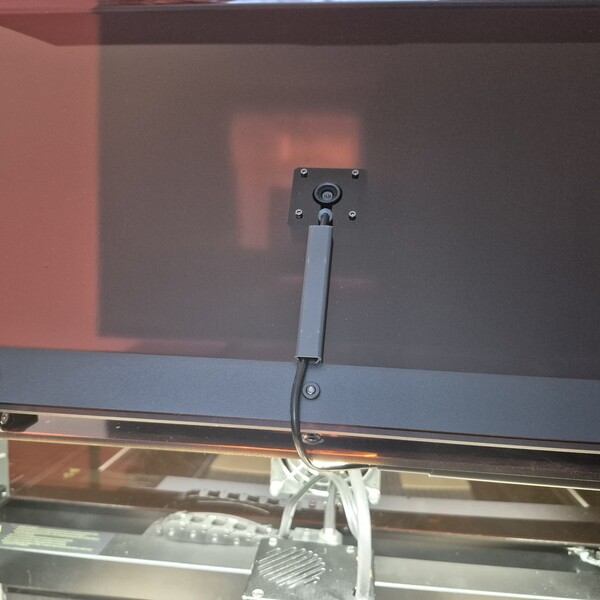
Before moving on to the software, I had to remove the plastic cover from the camera inside the lid. That little transparent film sits right over the lens, and the manual doesn’t shout about it, so the camera feed looked wrong until I removed it.
Software setup
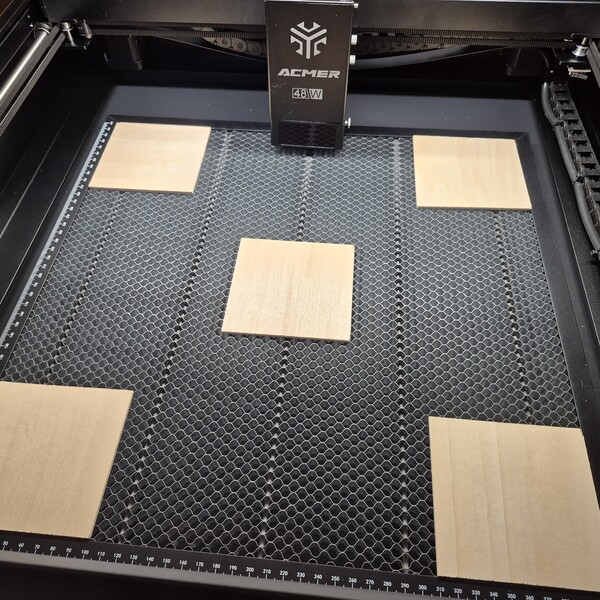

Control for my unit runs through LightBurn on a Windows PC. The P3 also works with macOS, but LightBurn on Windows was the easiest way to use the built-in camera; other software options I tried didn’t handle the camera as cleanly.
Power-on order matters. Before opening any software, I have to:
- Insert the key
- Twist it to the “on” position
- Press the power button
Only after that sequence does the PC see the device over USB. Skip a step, and LightBurn will sit there waiting for a machine that never appears.
LightBurn device and calibration
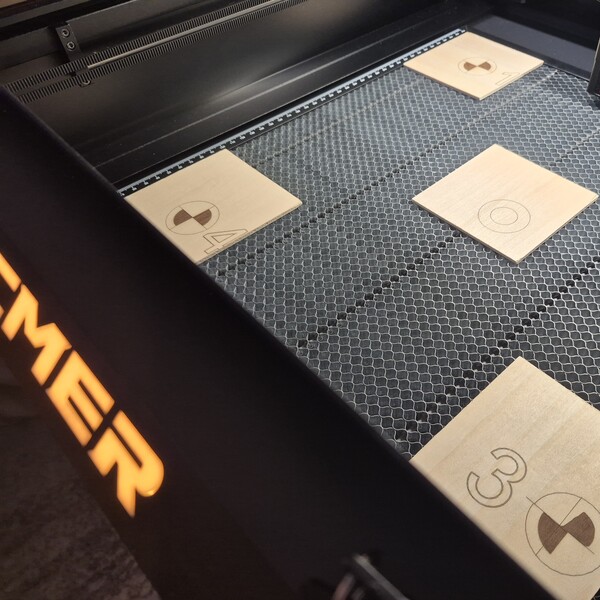
The manual walks through the LightBurn setup in detail, and it really is worth following line by line. The process is not five minutes; it’s a proper session. Steps include:
- Adding the P3 as a device in LightBurn
- Running camera calibration so LightBurn learns how the lid camera sees the bed
- Running laser calibration so positions in the software line up with real-world movement
Reading the manual closely here saves a lot of guesswork later.
Safety during camera alignment
Part of the camera alignment fires the laser to engrave reference marks on a sheet inside the machine. For that step, I:
- Wore proper eye protection
- Turned on the exhaust fan at the back of the unit
- Cracked a window
Smoke builds quickly during those calibration burns, so treating it like a real job and ventilating the room is essential.
My First Engraving Workflow
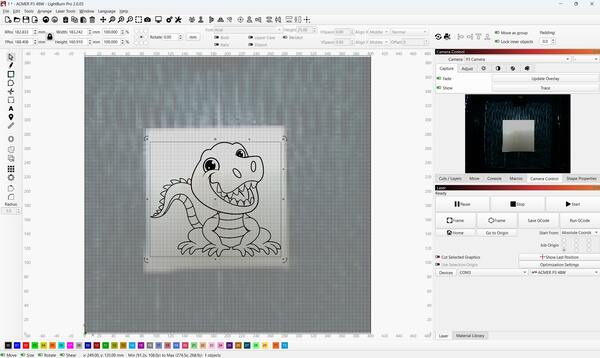
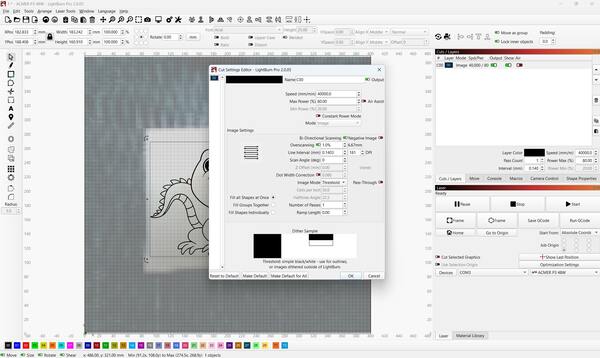

Once calibration was out of the way, actual engraving followed a pretty simple pattern:
- Place engraving material on the honeycomb bed.
- Open LightBurn and load the engraving file.
- Update the camera overlay so the software shows a current image of what’s inside the machine.
- Use the camera view to position and scale the design over the material.
- Adjust cut and engrave settings for that material, referring back to the user manual and any test grids.
- Begin the job and observe the first run closely.
After a few passes with the same material, that whole routine settles into a rhythm and becomes much quicker.
My Impression of Engraving Performance

Engraving isn’t instant, but it does feel quicker than many smaller diode machines I’ve used. Once power, speed, and focus are dialed in, the P3 moves through wood engraves at a pace that makes sense for paid work or batch gifts, not just one-off tests.
On the hardware side, the unit itself feels straightforward. Once you know the power-on sequence and basic controls, daily use is friendly. The software side takes more patience. LightBurn has numerous controls, and achieving good results with the P3 requires running a few test pieces and adjusting settings until you find combinations that work well with your materials. After that, runs feel much smoother.
Here are some points that stand out to me:
- The machine throws off a lot of smoke on deeper engraves, so proper ventilation isn’t optional.
- The noise level is acceptable for a workshop: not whisper-quiet, but not unbearable either.
- The air pump is the loudest part of the setup, which lines up with what I’d expect from a small compressor-style pump.
- The lid really does act like one big piece of eye protection over the bed, which feels far better than staring at an open beam on a bare frame.
Pros and cons
At this point, I’d run enough jobs that the strengths and weak spots were pretty obvious, so here’s how the P3 48W shakes out on my bench.
Pros
- The box arrives with everything needed to start, including the machine, head, air pump, exhaust hose, tools, and sample materials.
- Enclosed design with a large lid feels much safer than open-frame rigs.
- The setup steps for the P48 head are clear and doable with the supplied manual and tools.
- LightBurn support, along with camera integration, provides a modern workflow once configured.
- Engraving and cutting speeds are noticeably better than those of low-power hobby diodes.
- Controls and ports are laid out in a way that makes sense once you’ve done the first run.
Cons
- The box is heavy enough that moving it alone to bench height can be awkward.
- Setting up software, especially camera and laser calibration in LightBurn, requires time and patience.
- The machine creates a lot of smoke on real jobs; running it without a good ventilation plan isn’t realistic.
- The air pump adds a chunk of noise to the setup.
- Learning curve on LightBurn can feel steep if you’re entirely new to this type of software.
Who It’s For / Who It’s Not For?
Not every laser fits every workshop, so it helps to be blunt about who’s likely to get along with the P3 and who’ll just get frustrated.
Who it suits
These are the people I can see being genuinely happy with this machine:
- Users who want an enclosed diode laser for a home workshop or small studio.
- People who are comfortable following a detailed manual for setup and LightBurn configuration.
- Makers who plan to engrave and cut wood, acrylic, and similar materials often enough to justify dialing in proper settings.
- Anyone who already uses LightBurn with other lasers and wants to add a more powerful enclosed unit.
Who it’s not for
If this sounds like you, I’d look at something simpler or more automated:
- People who want a fully plug-and-play laser with minimal setup and calibration requirements.
- Users who don’t have a realistic way to vent smoke or use a filter system.
- Anyone hoping to control a 48W laser primarily from a phone app, without needing to use desktop software.
- Folks who are entirely new to maker tools and aren’t ready to spend time learning LightBurn or similar software.
ACMER P3 48W Diode Enclosed Laser Engraver Review: What Do Customers Think?
If you’re serious about a machine like this, you can’t just go off one person’s setup story… You should also consider what other owners are saying. I also reviewed customer feedback on the product page.
Feedback on ACMER and the P3 line leans strongly positive, especially regarding build, performance, and how “serious” the machine feels compared to cheaper hobby gear. Several buyers immediately call out the packaging and hardware quality. One review puts it simply: “Quality from the packaging to product. First I want to say the packaging was beyond my expectations but given the product very necessary. Every item assembled easily with a feel of quality.”
Modularity is another big plus. Users appreciate that they can start with one module and grow into more powerful or IR modules later, rather than buying a whole new machine. One person summed that up as: “You can take the base module and then go back and add other modules as needed. You can have this 48/24W module and add a 10W/2W IR module if you prefer. And then you’re getting the best of all worlds, from lower spot sizes all the way up to 48 for high-quality engraving. And then the IR can also handle some metals and plastics, as well as now you can put a variety of different modules on this laser.”
Owners coming from other brands feel like the P3 is a clear upgrade in practice, not just on paper. One reviewer who already had another diode machine wrote: “I started with a xtool D1 pro and added the P3 and love it. Would recommend it to anyone.” That matches the general tone: people who already know their way around lasers are happy folding the P3 into an existing setup.
Engraving quality receives a lot of attention too, especially for its depth and clean detail without burnt edges. A woodworker described one of their first jobs like this: “Wow, look at this, this is exactly what I was looking for, crisp and beautiful detail throughout the carving, the depth is close to a tenth of an inch when I examine the entire cut. No burnt look, just clean, not even cleaned up, I will leave it as is.”
Small business users emphasize speed and accuracy as the primary benefits. One reviewer using the P3 for ornaments said: “I love my new P3. The speed and accuracy really allowed me to step up my production of ornaments for this years Christmas craft shows. I look for to using the P3 to expand my business in 2025. Thank you.” That aligns with the idea of the P3 as a tool for real production runs, rather than just weekend experiments.
Is ACMER Legit?
Yes, it is legit. ACMER operates as a reputable manufacturer with over eight years of experience in the laser engraving space, its own branded product line, and a comprehensive ecosystem of machines and accessories, rather than rebadged generics. The company clearly identifies registered trademarks and multiple regulatory certifications (FCC, CE, RoHS, FDA, WEEE, etc.), provides a direct phone number along with separate support and sales email addresses, and maintains transparent policies for warranty, refunds, shipping, and privacy on its website.
Is the ACMER P3 48W Diode Enclosed Laser Engraver Worth It?

For my workshop, the P3 48W absolutely makes sense. I wanted an enclosed laser that felt like a fundamental tool, not a science project on rails, and this hits that mark: plenty of power in the 48W head, a bed big enough for cutting boards and small batches, a proper metal chassis with a big tinted lid, built-in air assist, and a camera that talks to LightBurn.
Once everything is set up, I can drop in material, line up artwork visually, and run jobs with enough speed and depth that they’re helpful for real projects and small production runs, not just tests and one-offs.
What really sells it for me is how it fits into a longer-term setup. I can start with the 48/24W head and then add other modules later, rather than replacing the whole machine. The ecosystem around it, including the IR head, rotary, conveyor, and filter box, means I’m not limited if my work shifts from flat boards to tumblers or long stock.
Additionally, LightBurn support is another significant advantage. I can use the same software and habits I already have from other lasers. From my point of view, if you’re serious about running an enclosed diode in a home shop or small studio and are ready to treat it as a primary tool, the P3 48W is a machine that can be used to build a wide range of projects, and even a side business around.
ACMER Discounts and Promotions
ACMER runs aggressive promotions around peak seasons, and the current Christmas sale is one of those times when the numbers actually move significantly on the big machines, not just on accessories.
Here’s how their discounts and promotions usually break down:
- Seasonal sale events
They run big, time-boxed campaigns (like the current Christmas sale) with clear start and end dates. During these windows, headline savings go “up to $1,417 off” on selected machines, with the deepest cuts on P2/P3/K1 units. - Flat dollar discounts on machines
Instead of only percentage coupons, they show straight dollar amounts off the list price (hundreds off per machine). It’s easy to see what you’re actually saving on each model. - Free shipping to key regions
Promo pages highlight free shipping to the US and EU, which is particularly important for heavy, enclosed machines where freight can significantly increase the total cost. - Gifts bundled with purchases
Some sale periods include “exquisite gifts” with orders. Those are usually extra items to round out a setup, meant to sweeten the deal on top of the price drop. - Buy now, pay later options.
They integrate with finance providers like Affirm, Klarna, Afterpay, and similar, so you can spread payments instead of paying the full price at checkout. I noticed this is displayed prominently on the product and promo pages. - Warranty and compensation promises
Alongside discounts, they highlight a one-year warranty and a 30-day “full compensation” window on sale pages, which is their way of reassuring buyers that a promo purchase still gets standard protection and support.
Where Can I Buy the ACMER P3 48W Diode Enclosed Laser Engraver?
I can purchase the ACMER P3 48W directly from ACMER’s official website or through their storefronts on major marketplaces. Personally, I’d start with the official site, as that’s where the best bundles, sale prices, and detailed specs tend to appear first, especially around major promotions like their Christmas sale. It’s also available under the ACMER name on Amazon.
FAQs
What materials can the ACMER P3 cut and engrave?
With the diode laser, the P3 can cut paper, wood, leather, MDF, felt, and some dark opaque acrylic. It can engrave paper, wood, leather, MDF, stainless steel, dark opaque acrylic, bamboo, fabric, dark glass, ceramic, jade, marble, shale, cement, brick, plated metal, and painted metal.
The IR laser can engrave metal, dark plastic, and non-transparent acrylic.
What’s the difference between the IR laser and the diode laser?
The IR laser is aimed at metals and some plastics, with a smaller spot size for finer detail on materials such as gold, silver, copper, aluminum, stainless steel, ABS, acrylic, PC, leather, and specific stones. The diode laser is better suited for woodworking and general use, offering good engraving on wood, ceramic, acrylic, and plastic, with stronger cutting performance overall.
How big can the ACMER P3 engrave?
With a 24W diode or 2W IR module, the P3 engraves up to 400 × 400 mm. With a 48W diode or dual-laser setup, the area is 400 × 390 mm. With the optional conveyor attached, the length can extend up to 4000 mm while keeping a 400 mm width.
Next, check out other reviews that you might also like:




Ask the community or leave a comment
WRITE A REVIEWCustomer Reviews
Leave a review