
In partnership with Adobe
Written by Dorothy M., HBR Editor
Tested on October 29, 2026, using the latest version of Adobe Acrobat.
Adobe Acrobat Pro is the best fit for professionals who edit, convert, sign, or redact PDFs every week. For $19.99/mo on an annual plan, it includes the PDF Edit tool, Export PDF to Word, Excel, and PowerPoint, Scan & OCR for paper documents, Redact a PDF, and Send in Bulk for up to 50 e-signature recipients at once. Acrobat Studio adds AI Assistant and PDF Spaces for summarizing and questioning documents, and the free Acrobat Reader covers viewing, commenting, and signing.
Table of Contents
What Is Adobe Acrobat?
Adobe created the PDF format, and Acrobat is the company’s own app for working with PDFs. The lineup runs from the free Acrobat Reader to three paid plans, Acrobat Standard, Acrobat Pro, and Acrobat Studio, plus team versions with an admin console and around-the-clock support.
Acrobat Studio, launched in August 2025, added AI Assistant, PDF Spaces, and Adobe Express Premium to everything in Acrobat Pro.
Highlights
- Adobe created the PDF format, and Acrobat is its own app for creating, editing, and signing PDFs.
- Adobe’s compliance list shows SOC 2 Type 2, SOC 3, ISO 27001, ISO 27017, ISO 27018, and FedRAMP Tailored for Acrobat Studio, and Adobe states that it never uses customer documents to train AI models.
- The free Acrobat Reader handles viewing, commenting, and Fill & Sign on desktop and mobile.
- Paid plans add the Edit tool, Export a PDF to Microsoft Office formats, and Request e-signatures.
- Acrobat Pro adds Scan & OCR, Redact a PDF, Compare files, and Send in bulk.
- Acrobat Studio brings in AI Assistant, PDF Spaces, and Adobe Express Premium for summaries, document chats, and presentations.
- A single subscription works across Windows, Mac, the web, iOS, and Android.
- A 7-day free trial covers Acrobat Pro and Acrobat Studio.
Why You Should Trust Us
Our mission is to help you make better, more informed purchase decisions.
Our team spends hours researching, gathering insight from expert professionals, reviewing customer feedback, and analyzing products to provide you with the information you need.
Adobe Acrobat Review
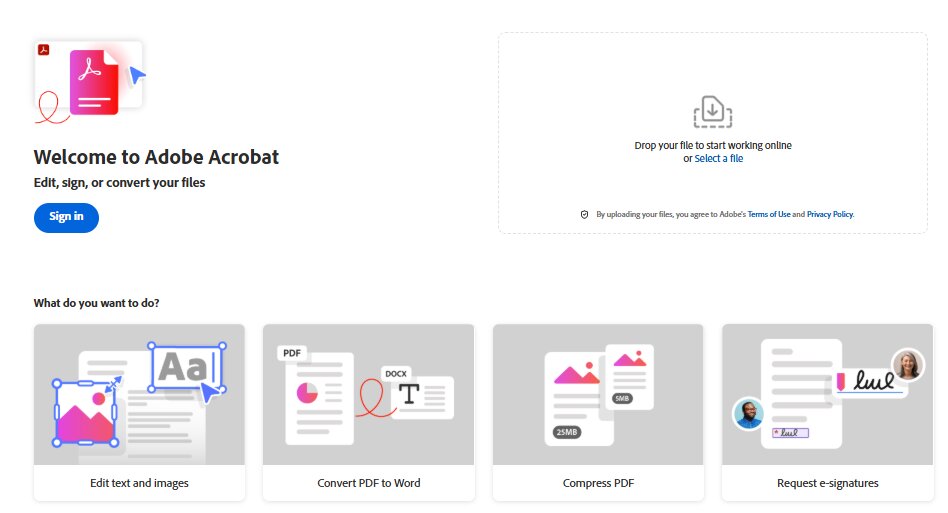
Acrobat covers the full life cycle of a document, from creating and editing a PDF to signing and storing it. The features below show what each plan adds, so you can match a plan to the work you actually do.
What You Can Do With Adobe Acrobat?
Edit PDF changes Text and Images
Acrobat’s Edit tool, included in Standard and higher plans, changes text, fonts, and images directly in a PDF, much like editing a Word file. Page tools let you add, delete, rotate, and reorder pages, and Combine Files merges several documents into one PDF.
A price fix on a quote or a new logo on a brochure takes a few clicks, with no need to track down the original source file.
Export PDF to Word, Excel, and PowerPoint
Export PDF converts PDFs into Word, Excel, and PowerPoint files, plus JPG, PNG, TIFF, and HTML, and Acrobat turns Office files back into PDFs.
A finance team can pull a table from a PDF report into Excel without retyping it, and a marketer can turn a PDF deck back into editable slides.
Scan & OCR: Turn Scans Into Editable PDFs (Acrobat Pro)
Scan & OCR in Acrobat Pro turns scanned pages into searchable, editable PDFs. Scanned contract, an old receipt, or a photographed page becomes text you can search, copy, and change.
Adobe Scan, Adobe’s mobile scanning app, pairs with Acrobat to capture paper documents with a phone camera.
Request E-signatures and Send in Bulk
Request e-signatures, included on every paid plan, sends documents to others to sign, and Fill & Sign lets you complete and sign forms yourself. Acrobat Pro adds the tools that busier teams rely on.
- Send in bulk. You can send one agreement to up to 50 recipients, and each person gets their own copy with its own audit report.
- Web forms. People can fill out and sign from a link on your website.
- Reusable templates. Agreements you send often are ready to go.
- Branded agreements. Documents carry your logo and a custom URL.
Redact and Compare Files (Acrobat Pro)
Redact in Acrobat Pro permanently removes sensitive information, such as account numbers or personal details, before a file goes out. Compare files highlights every change between two versions of a PDF, so you don’t have to read two versions of a contract side by side.
Every paid plan, including Standard, can password-protect PDFs so only the right people can open them.
AI Assistant and PDF Spaces (Acrobat Studio)
AI Assistant in Acrobat Studio answers questions about a document and writes summaries, and PDF Spaces works across many files at once.
- AI Assistant. It answers questions, writes one-click summaries, and takes voice commands on mobile.
- PDF Spaces. It gathers PDFs, Microsoft 365 files, and web links into one workspace you can question and share.
- AI editing. You can ask AI to edit, convert, and compress PDFs.
- Audio overviews. Documents become podcast-style summaries you can listen to.
Adobe Help states that “Adobe never uses your documents or data to train AI models.” Acrobat’s generative AI features work with files in English, French, German, Spanish, Italian, Brazilian Portuguese, Japanese, Korean, Danish, Norwegian, Finnish, Swedish, and Dutch.
Generate Presentation (Acrobat Studio)
Generate presentation in Acrobat Studio turns documents or a PDF Space into an editable slide deck, powered by Adobe Express. Studio also includes Adobe Express Premium, with thousands of professional templates…
A consultant can turn a research report into a client deck, then open it in Express to adjust the design.
Adobe’s Acrobat Studio page says “thousands of professional templates.” I couldn’t find the 500,000 figure.
Work on Windows, Mac, the Web, iOS, and Android
Every paid Acrobat plan runs on Windows and Mac, in a web browser, and on iOS and Android, along with browser extensions. You can start a document at your desk and finish signing it from your phone.
Start Free With Acrobat Reader and Online Tools
Acrobat Reader is free to download and use without a subscription. It lets you view, print, share, and comment on PDFs and use Fill & Sign to complete forms on desktop and mobile.
Adobe’s free online tools also handle quick jobs in a browser, such as compressing, merging, splitting, and converting files.
Adobe Acrobat Plans and Pricing
Adobe offers a free reader and three paid plans for individuals, with team versions of each. The prices below come from Adobe’s plans page and business pricing page.
- Acrobat Reader
Free. Includes viewing, printing, sharing, commenting, and Fill & Sign.
- Acrobat Standard
$14.99/mo on an annual plan billed monthly, $179.88/yr paid upfront, or $24.99 month to month. Includes the Edit tool, page organizing, Export a PDF, Request e-signatures, and password protection.
- Acrobat Pro
$19.99/mo on an annual plan billed monthly, $239.88/yr paid upfront, or $29.99 month to month. Includes everything in Standard, plus Scan & OCR, Redact a PDF, Compare files, web forms, reusable e-sign templates, branded agreements, and Send in bulk.
- Acrobat Studio
$24.99/mo on an annual plan billed monthly, $299.88/yr paid upfront, or $34.99 month to month. Includes everything in Pro, plus AI Assistant, PDF Spaces, and Adobe Express Premium.
- Acrobat for teams
Acrobat Standard for teams costs $16.99/mo per license, Acrobat Pro for teams costs $23.99/mo per license, and Acrobat Studio for teams costs $29.99/mo per license, all on annual plans billed monthly. On team plans, the company owns the files, IT gets an admin console, and Adobe provides 24×7 support.
| Plan | Annual plan, billed monthly | Annual plan, paid upfront | Month to month | Teams (per license, annual plan) | What’s included |
|---|---|---|---|---|---|
| Acrobat Reader | Free | Free | Free | — | Viewing, printing, sharing, commenting, and Fill & Sign |
| Acrobat Standard | $14.99/mo | $179.88/yr | $24.99/mo | $16.99/mo | The Edit tool, page organizing, Export a PDF, Request e-signatures, and password protection |
| Acrobat Pro | $19.99/mo | $239.88/yr | $29.99/mo | $23.99/mo | Everything in Standard, plus Scan & OCR, Redact a PDF, Compare files, web forms, reusable e-sign templates, branded agreements, and Send in bulk |
| Acrobat Studio | $24.99/mo | $299.88/yr | $34.99/mo | $29.99/mo | Everything in Pro, plus AI Assistant, PDF Spaces, and Adobe Express Premium |
On team plans, the company owns the files, IT gets an admin console, and Adobe provides 24×7 support.
Which Acrobat Plan Should I Choose?
- Occasional users and students: Acrobat Reader (free). Fill & Sign and commenting cover forms, school documents, and feedback without a subscription.
- Freelancers: Acrobat Standard ($14.99/mo, annual plan). The Edit tool fixes client documents, and Request e-signatures gets contracts signed without printing.
- Legal, finance, and HR teams: Acrobat Pro for teams ($23.99/mo per license). Redact a PDF removes sensitive data before sharing, and Send in bulk sends onboarding forms or agreements to up to 50 people at once.
- Researchers and consultants: Acrobat Studio ($24.99/mo, annual plan). AI Assistant summarizes long reports, and PDF Spaces lets you question many documents together.
Adobe Acrobat vs. Alternatives
- Foxit PDF Editor. Foxit PDF Editor costs $129.99/yr per user and pairs editing, OCR, and redaction with an admin console and document management for teams. Signature requests need PDF Editor+, which includes 150 envelopes a year. Acrobat includes Request e-signatures on every paid plan and adds Send in bulk on Pro.
- Smallpdf. Smallpdf handles quick jobs like compressing, converting, and signing PDFs in a browser, with a free tier and Pro at $12/mo billed yearly. Editing existing text requires Pro, and Smallpdf has no file comparison tool. Acrobat adds Compare files, Send in bulk, and a Mac desktop app.
- Nitro PDF. Nitro PDF suits people who work in Microsoft 365, with an Office-style interface and add-ins for Word, Excel, and Outlook. It costs $180/yr per user, bills annually only, and needs a separate Nitro Sign plan for signature requests. Acrobat includes signature requests on every paid plan and runs on Android and the web as well.
Acrobat’s difference is breadth, with Scan & OCR, Redact a PDF, Send in bulk, AI Assistant, and apps on five platforms within one product line.
Is Adobe Acrobat Legit?
Yes, Adobe Acrobat is a legitimate PDF app from Adobe, the company that created the PDF format. Adobe’s compliance list shows SOC 2 Type 2, SOC 3, ISO 27001, ISO 27017, ISO 27018, ISO 22301, FedRAMP Tailored, and CSA STAR Level 2 for Acrobat Studio.
Is Adobe Acrobat Worth It?
Yes, Adobe Acrobat is worth it if you work with PDFs every week, from freelancers sending invoices to legal and finance teams. Acrobat Standard covers editing, Export a PDF, and Request e-signatures. Export a PDF moves a table into Excel without retyping it, and Request e-signatures replaces printing, signing, and scanning a form.
Acrobat Studio suits people who read and summarize many documents. AI Assistant, PDF Spaces, and Adobe Express Premium turn long reports into answers, summaries, and presentations, and a 7-day free trial lets you test it with your own files first.
Pros
- Scan & OCR, Redact a PDF, and Compare files in one app on Acrobat Pro.
- Request e-signatures on every paid plan, with Send in bulk for up to 50 recipients on Pro.
- One subscription works on Windows, Mac, the web, iOS, and Android.
Cons
- Redaction, OCR, and file comparison require Pro, not Standard.
- AI Assistant and PDF Spaces require Acrobat Studio.
- Month-to-month billing costs $10 more per month than the annual plan on every tier.
Verdict. Adobe Acrobat Pro is the plan most professionals need, combining editing, Scan & OCR, Redact a PDF, and Send in bulk for $19.99/mo on an annual plan. Acrobat Studio adds AI Assistant and PDF Spaces for $5 more a month, and the free Acrobat Reader covers viewing and signing.
Adobe Acrobat Free Trials and Offers
Adobe offers a few ways to try Acrobat or save on it. Here’s what’s available now.
- 7-day free trial. Acrobat Pro and Acrobat Studio come with a 7-day free trial, with no payment due until the trial ends.
- Free Acrobat Reader. Reader covers viewing, commenting, and Fill & Sign.
- Free online tools. Quick jobs like compressing, merging, and converting files work in a browser.
- Acrobat Express for teams. Teams save 31% on the first year when they buy 2 or more licenses, paying $8.26/mo per license instead of $11.99.
Frequently Asked Questions
Is Adobe Acrobat free?
Acrobat Reader is free. It lets you view, print, and comment on PDFs and use Fill & Sign to complete and sign forms on desktop and mobile. Editing text and images, Export a PDF to Office formats, and AI tools require a paid plan, starting with Acrobat Standard at $14.99/mo on an annual plan.
Is Adobe Acrobat worth it?
Adobe Acrobat is worth it if you edit, convert, or sign PDFs every week. Acrobat Pro, at $19.99/mo on an annual plan, combines editing, Scan & OCR, Redact a PDF, Compare files, and Send in bulk in one app. People who only view and sign PDFs can use the free Acrobat Reader instead.
What’s the difference between Acrobat Standard and Acrobat Pro?
Acrobat Pro adds Scan & OCR, Redact a PDF, Compare files, web forms, and Send in bulk to everything in Acrobat Standard. Standard covers editing, Export a PDF, Request e-signatures, and password protection for $14.99/mo on an annual plan. Pro costs $19.99/mo, or $5 more, and suits anyone who works with scanned or sensitive documents.
What does Acrobat Studio add?
Acrobat Studio adds AI Assistant, PDF Spaces, and Adobe Express Premium to everything in Acrobat Pro. AI Assistant answers questions about documents and writes summaries, PDF Spaces works across many PDFs, Microsoft 365 files, and web links at once, and Generate presentation turns documents into slide decks. Studio costs $24.99/mo on an annual plan.
Does Adobe use my PDFs to train AI?
No. Adobe’s Help Center states that “Adobe never uses your documents or data to train AI models.” That covers AI Assistant and PDF Spaces in Acrobat Studio. Acrobat’s generative AI features work with files in 13 languages, including English, French, German, Spanish, Italian, Brazilian Portuguese, Japanese, and Korean.
How does Adobe Acrobat compare with alternatives?
Foxit PDF Editor, Smallpdf, and Nitro PDF all cost less per year than Acrobat Pro and cover core PDF editing. Foxit adds team document management, Smallpdf handles quick browser tasks, and Nitro fits Microsoft 365 users. Acrobat’s difference is breadth, with Scan & OCR, Redact a PDF, Send in bulk, AI Assistant, and five platforms across its plans.
Does Adobe Acrobat work on Mac and mobile?
Yes. Every paid Acrobat plan works on Windows and Mac, in a web browser, and on iOS and Android under one subscription. You can start editing a document on your computer and finish it with Fill & Sign on your phone. The free Acrobat Reader is also available on desktop and mobile devices.
Final Thoughts
Adobe Acrobat handles every step of working with PDFs in one product line, from editing text and exporting files to collecting signatures and redacting sensitive information. The free Reader covers light use, Acrobat Standard handles everyday editing, and Acrobat Pro adds Scan & OCR, Redact a PDF, and Send in bulk.
Acrobat Studio adds AI Assistant, PDF Spaces, and Generate presentation for people who work through many documents. If you’re deciding between plans, the 7-day free trial lets you test Pro or Studio with your own files.
Looking for more insights? Explore these reviews:





Ask the community or leave a comment
WRITE A REVIEWCustomer Reviews
Leave a review